
Skritter Review (for Chinese & Japanese) - Should I Download It?

Learning Chinese or Japanese can be challenging, especially when it comes to mastering characters. Skritter, a popular language-learning app, aims to simplify this process by focusing on writing practice through interactive stroke-order drills and spaced repetition. But is it worth downloading? This review explores Skritter’s features, strengths, and weaknesses for learners of Chinese and Japanese. From its handwriting recognition to customizable study decks, we’ll break down whether the app lives up to its promises. Whether you’re a beginner or an advanced student, discover if Skritter is the right tool to enhance your character-writing skills and accelerate your language-learning journey.
Skritter Review (for Chinese & Japanese) – Is It Worth Downloading?
What Is Skritter and How Does It Work?
Skritter is a language-learning app designed specifically for mastering Chinese and Japanese characters. It focuses on helping users learn to write and recognize characters through interactive stroke-order practice, spaced repetition, and quizzes. The app tracks your progress and adjusts difficulty based on your performance, ensuring efficient learning.
| Feature | Description |
|---|---|
| Stroke-Order Practice | Teaches the correct way to write each character. |
| Spaced Repetition | Optimizes review timing for better retention. |
| Customizable Decks | Allows users to focus on specific vocabulary sets. |
Does Skritter Improve Writing Skills Effectively?
Yes, Skritter is highly effective for improving writing skills in Chinese and Japanese. The app enforces correct stroke order and provides instant feedback, helping users avoid bad habits. Studies show that writing characters by hand enhances memory retention, making Skritter a powerful tool for long-term learning.
See AlsoRemembering is a skill you can learn| Benefit | Impact |
|---|---|
| Muscle Memory | Reinforces character recall through writing. |
| Real-Time Corrections | Prevents mistakes from becoming habitual. |
How Does Skritter Compare to Other Language Apps?
Unlike apps like Duolingo or Memrise, which focus on vocabulary and grammar, Skritter specializes in character writing. While other apps may include writing exercises, Skritter’s stroke-by-stroke guidance and handwriting recognition make it superior for mastering kanji and hanzi.
| App | Focus |
|---|---|
| Skritter | Writing & character recognition. |
| Duolingo | General vocabulary & sentences. |
| Memrise | Flashcards & memorization. |
Is Skritter Suitable for Beginners and Advanced Learners?
Skritter caters to all levels, from beginners learning basic strokes to advanced learners tackling complex characters. The app offers pre-made decks for different proficiency levels, including JLPT and HSK vocabulary, making it adaptable for various learning stages.
| Level | Features |
|---|---|
| Beginner | Basic characters & stroke order. |
| Intermediate | Common words & phrases. |
| Advanced | Specialized vocabulary & idioms. |
What Are the Pricing and Subscription Options?
Skritter operates on a subscription model, with monthly and yearly plans. While not free, it offers a free trial to test features. The cost may be higher than some apps, but its specialized focus justifies the price for serious learners.
See AlsoDon’t learn Mandarin pronunciation by reading, listen and mimic instead| Plan | Price |
|---|---|
| Monthly | $14.99/month |
| Yearly | $99.99/year |
| Free Trial | 7 days |
Does Skritter have traditional Chinese?

Does Skritter Support Traditional Chinese Characters?
Yes, Skritter supports Traditional Chinese characters alongside Simplified Chinese. The app is designed to cater to learners who focus on either writing system, providing comprehensive tools for both. Here are some key features:
- Character options: Users can toggle between Traditional and Simplified Chinese in settings.
- Stroke order: Skritter teaches the correct stroke order for Traditional characters.
- Vocabulary lists: Many pre-made decks include Traditional Chinese versions.
How to Switch to Traditional Chinese in Skritter?
Switching to Traditional Chinese in Skritter is straightforward. Follow these steps to adjust your preferences:
See AlsoOutlier Chinese Character Masterclass review: Understand more, learn faster, remember longer- Open the Settings menu in the app or web version.
- Locate the Language or Character Set option.
- Select Traditional Chinese from the dropdown menu.
Are Skritter’s Traditional Chinese Resources Comprehensive?
Skritter offers extensive resources for Traditional Chinese learners, including:
- Character drills: Practice writing hundreds of Traditional characters.
- Textbook integration: Supports popular textbooks like Integrated Chinese (Traditional edition).
- Custom decks: Users can create or import decks with Traditional characters.
Does Skritter Teach Traditional Chinese Stroke Order Correctly?
Skritter emphasizes accurate stroke order for Traditional Chinese, which is crucial for proper handwriting. Key aspects include:
- Animated demonstrations: Shows the correct stroke sequence for each character.
- Real-time feedback: Alerts users if strokes are written incorrectly.
- Regional variations: Covers differences in stroke order between Taiwan and Hong Kong standards.
Can You Learn Both Traditional and Simplified Chinese on Skritter?
Skritter allows learners to study both writing systems simultaneously or separately. Here’s how:
- Dual display: Some decks show both Traditional and Simplified versions side by side.
- Customizable study modes: Focus on one system or compare differences.
- Conversion tools: Helps users understand equivalent characters between systems.
What is the best app to practice Chinese writing?
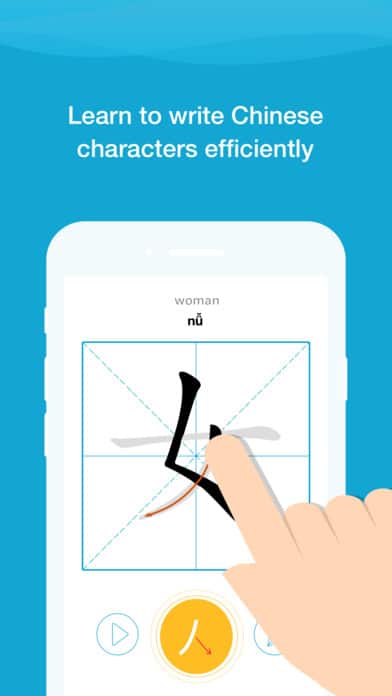
Best Apps for Practicing Chinese Writing
When it comes to improving Chinese writing skills, several apps stand out for their effectiveness and user-friendly features. Here are the top choices:
- Skritter: Combines handwriting recognition with spaced repetition to help memorize characters.
- HelloChinese: Offers interactive writing exercises and stroke-order guidance.
- Pleco: A powerful dictionary app with a built-in flashcard system for writing practice.
- Hanping Chinese: Focuses on stroke-order animations and character breakdowns.
- TOFU Learn: Uses flashcards and quizzes to reinforce character writing.
Features to Look for in a Chinese Writing App
Choosing the right app depends on key features that enhance learning. Consider the following:
- Stroke-order guidance: Ensures you learn the correct way to write characters.
- Spaced repetition: Helps retain characters long-term.
- Handwriting recognition: Provides instant feedback on accuracy.
Free vs. Paid Chinese Writing Apps
Deciding between free and paid apps depends on your budget and learning goals. Here’s a comparison:
- Free apps (e.g., HelloChinese, TOFU Learn) offer basic features but may include ads.
- Paid apps (e.g., Skritter, Pleco Pro) provide advanced tools like offline access and additional content.
- Freemium models allow limited free use with optional upgrades.
How to Maximize Learning with a Chinese Writing App
To get the most out of your app, follow these strategies:
- Practice daily: Consistency is key to mastering characters.
- Use supplementary tools: Combine apps with notebooks for reinforcement.
- Track progress: Set goals and monitor improvements over time.
Common Challenges When Learning Chinese Writing
Learners often face obstacles when practicing Chinese writing. Here’s how to overcome them:
- Complex characters: Break them down into radicals for easier memorization.
- Forgetting stroke order: Use apps with animations to reinforce correct techniques.
- Lack of motivation: Join online communities or set milestones to stay engaged.
Is Skritter app free?
Is Skritter App Free to Download?
The Skritter app is free to download on both iOS and Android platforms. However, while the initial download does not require payment, accessing its full features may require a subscription or in-app purchases.
- The app can be downloaded from the App Store or Google Play at no cost.
- Basic functionality, such as limited character practice, may be available for free.
- Advanced features, like full vocabulary lists or progress tracking, often require a paid plan.
What Features Are Free in Skritter?
The free version of Skritter offers limited access to its core features, primarily focused on basic character writing practice and introductory lessons.
- Users can practice a restricted number of Chinese or Japanese characters per day.
- Access to community-created lists may be available but with limitations.
- Some grammar and vocabulary exercises are included, but deeper content is locked.
Does Skritter Offer a Free Trial?
Yes, Skritter provides a free trial period for new users to explore its premium features before committing to a subscription.
- The trial typically lasts for 7 days, allowing full access to all features.
- After the trial ends, users must choose a paid plan to continue using premium tools.
- No credit card is required to start the trial, making it risk-free.
What Are Skritter’s Subscription Plans?
Skritter offers several paid subscription options for users who want unlimited access to its features.
- Monthly plans provide flexibility but are more expensive in the long term.
- Annual plans offer cost savings compared to monthly payments.
- Discounts may be available for students or long-term commitments.
Are There Alternatives to Skritter That Are Free?
While Skritter has a freemium model, some alternatives offer completely free language-learning tools for writing practice.
- Anki provides free flashcards with writing practice add-ons.
- HelloChinese includes free writing exercises for beginners.
- Pleco offers basic stroke-order diagrams without a subscription.
What is Skritter?
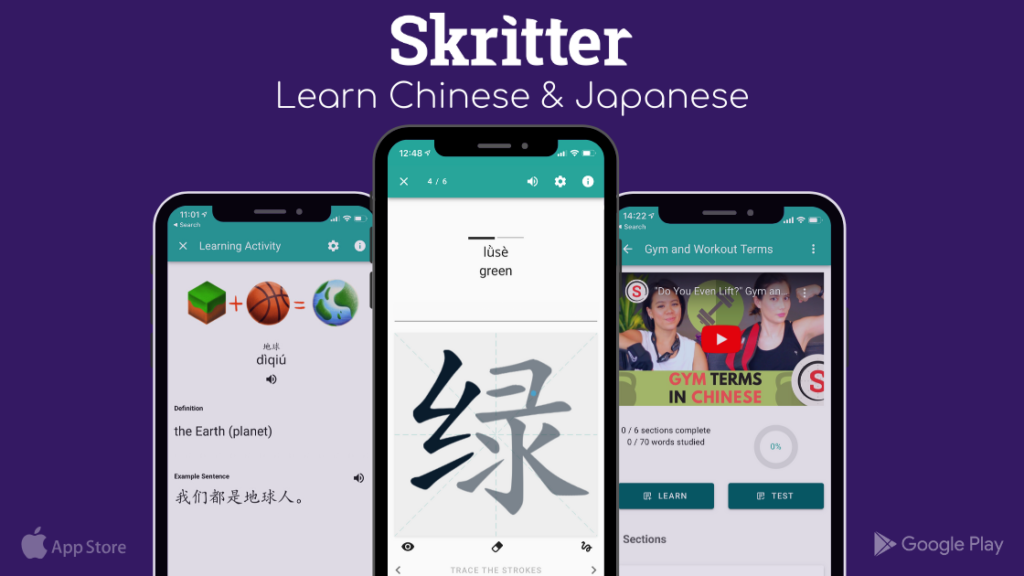
Skritter is a digital language-learning platform designed to help users master Chinese characters and Japanese kanji through interactive writing practice. It combines spaced repetition with stroke-order feedback, allowing learners to practice handwriting while reinforcing vocabulary and grammar. The app is widely used by students and professionals aiming to improve their reading, writing, and recall of East Asian scripts.
How Does Skritter Work?
Skritter uses a step-by-step approach to teach characters and kanji:
- Interactive Writing: Users trace characters on a touchscreen while receiving real-time feedback on stroke order and accuracy.
- Spaced Repetition: The app schedules reviews based on memory retention algorithms to optimize learning efficiency.
- Vocabulary Integration: Words and sentences are introduced in context, reinforcing both meaning and usage.
Key Features of Skritter
Skritter offers several unique tools to enhance learning:
- Stroke-Order Guidance: Ensures proper character formation with corrective feedback.
- Customizable Decks: Users can create or import study lists tailored to textbooks or personal goals.
- Progress Tracking: Detailed analytics show improvement in writing speed, accuracy, and retention.
Who Can Benefit from Skritter?
Skritter is ideal for:
- Language Students: Those studying Chinese or Japanese at any proficiency level.
- Travelers: Learners needing practical vocabulary for real-world communication.
- Professionals: Individuals requiring literacy for work or academic research.
Skritter vs. Traditional Learning Methods
Compared to conventional study techniques, Skritter provides:
- Efficiency: Reduces time spent memorizing characters through adaptive repetition.
- Engagement: Interactive exercises make practice more dynamic than paper-based drills.
- Accessibility: Available on multiple devices, enabling practice anytime, anywhere.
Is Skritter Worth It?
Skritter’s value depends on your learning style, but its proven effectiveness in character retention makes it a strong choice for:
- Visual Learners: The app’s emphasis on writing reinforces memory through motor skills.
- Self-Paced Students: Flexible study schedules cater to busy lifestyles.
- Exam Preparers: Useful for standardized tests like HSK or JLPT that require handwriting.
Frequently Asked Questions (FAQ)
What is Skritter and how does it help with learning Chinese and Japanese?
Skritter is a specialized language-learning app designed to help users master Chinese characters (Hanzi) and Japanese kanji through interactive writing practice. The app combines spaced repetition with stroke-order guidance, ensuring learners not only memorize characters but also write them correctly. By providing real-time feedback on strokes, radicals, and pronunciation, Skritter reinforces muscle memory and improves retention. Whether you're a beginner or advanced learner, the app adapts to your pace, making it a valuable tool for mastering these complex writing systems.
Is Skritter worth the subscription cost?
The value of Skritter depends on your learning goals. If you prioritize handwriting proficiency in Chinese or Japanese, the app's detailed feedback and structured curriculum justify the cost. Compared to traditional textbooks or free alternatives, Skritter offers a more interactive and efficient way to practice writing. However, if your focus is solely on speaking or reading, other free resources might suffice. Many users find the subscription worthwhile for its gamified approach and progress tracking, but trying the free trial first is recommended.
Can Skritter be used offline?
Yes, Skritter offers an offline mode, allowing users to practice writing characters without an internet connection. This feature is particularly useful for learners who want to study during commutes or in areas with poor connectivity. However, initial setup and synchronization require an internet connection to download lessons and updates. Once cached, your progress syncs automatically when you're back online. The offline functionality ensures uninterrupted practice, making it a flexible option for busy learners.
How does Skritter compare to other writing apps like Anki or Pleco?
While Anki and Pleco are excellent for vocabulary and flashcards, Skritter specializes in handwriting practice, setting it apart. Anki relies on user-created decks and lacks stroke-order feedback, whereas Skritter provides built-in stroke-by-stroke guidance and pronunciation drills. Pleco, though robust for dictionary functions, doesn’t emphasize writing as comprehensively. Skritter’s strength lies in its focused approach to character retention through active recall and motor skill development. For learners targeting writing fluency, Skritter is often the preferred choice.
Leave a Reply
Related Posts