
Free and easy audio flashcards for Chinese dictation practice with Anki

Mastering Chinese dictation can be challenging, but with the right tools, it becomes much more manageable. Anki, a powerful flashcard app, offers a free and easy way to practice Chinese characters through audio flashcards. These customizable cards allow learners to hear native pronunciations while testing their writing skills, reinforcing both listening and recall. Whether you're a beginner or advanced student, Anki's spaced repetition system ensures efficient memorization. This article explores how to create and use audio flashcards for Chinese dictation, providing step-by-step guidance to enhance your learning experience. Discover a practical, cost-effective method to improve your Chinese writing and listening skills effortlessly.
Free and Easy Audio Flashcards for Chinese Dictation Practice with Anki
Why Use Audio Flashcards for Chinese Dictation?
Using audio flashcards in Anki enhances Chinese dictation practice by improving listening and writing skills simultaneously. Hearing native pronunciations helps learners recognize tones and characters accurately, reinforcing memory retention.
| Benefit | Explanation |
|---|---|
| Improved Listening | Helps distinguish tones and syllables clearly. |
| Better Recall | Associates sounds with characters for stronger memory. |
How to Create Free Audio Flashcards in Anki
Creating free audio flashcards for Chinese dictation is simple. Use TTS (Text-to-Speech) tools or record native speakers, then import audio files into Anki.
See Also7 Hilarious Chinese Jokes To Make You Laugh (With Explanations!)| Step | Action |
|---|---|
| 1. Gather Audio | Use free TTS tools or record manually. |
| 2. Import to Anki | Add audio files to flashcard fields. |
Best Free Resources for Chinese Audio Clips
Several free resources provide high-quality Chinese audio for flashcards, such as Forvo, YouTube, or language learning platforms.
| Resource | Use Case |
|---|---|
| Forvo | Native speaker pronunciations. |
| YouTube | Extract audio from learning videos. |
Optimizing Anki Settings for Dictation Practice
Adjusting Anki settings like card intervals and review limits ensures efficient dictation practice.
| Setting | Recommendation |
|---|---|
| New Cards/Day | Start with 10-15 to avoid overload. |
| Review Intervals | Use Anki’s spaced repetition defaults. |
Tracking Progress in Chinese Dictation with Anki
Anki’s statistics help monitor improvement in Chinese dictation by tracking correct/incorrect answers and review times.
See AlsoThe nine principles of learning (and the mistakes from failing to follow them)| Metric | Importance |
|---|---|
| Retention Rate | Shows long-term memory effectiveness. |
| Review Time | Indicates speed and familiarity. |
Does Anki work for Chinese?
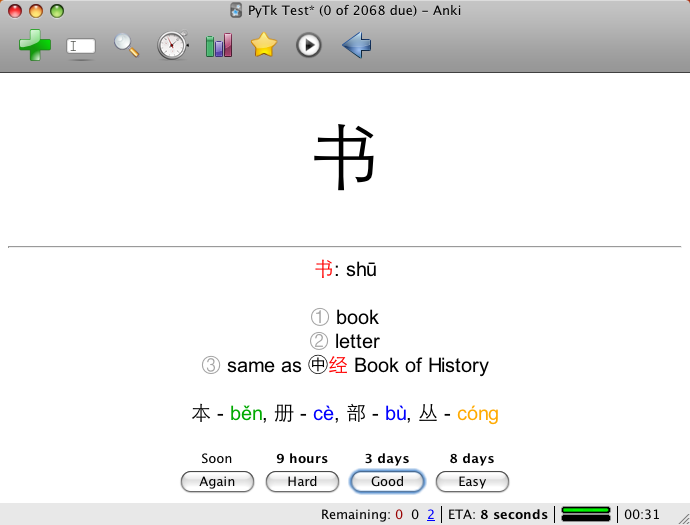
Is Anki Effective for Learning Chinese Characters?
Yes, Anki is highly effective for learning Chinese characters due to its spaced repetition system (SRS), which optimizes memory retention. Here’s why:
- Customizable flashcards allow you to focus on characters, pinyin, or meanings individually.
- The SRS algorithm ensures you review characters at optimal intervals to prevent forgetting.
- Pre-made decks like HSK Vocabulary or Common Chinese Characters save time for learners.
Can Anki Help with Chinese Pronunciation?
Anki can support Chinese pronunciation practice when used correctly. Key points include:
See AlsoThe Chairman’s Bao Review (2025) - Your Complete Guide- Adding audio clips to flashcards helps reinforce correct tones and sounds.
- Using pinyin alongside characters aids in associating sounds with written forms.
- Tools like Google TTS or native speaker recordings enhance accuracy.
How to Use Anki for Chinese Vocabulary Building?
Building Chinese vocabulary with Anki requires a structured approach:
- Organize flashcards by categories (e.g., nouns, verbs) or HSK levels.
- Include example sentences to understand context and usage.
- Regularly review and update decks to align with your progress.
Are There Pre-Made Anki Decks for Chinese?
Yes, numerous pre-made Anki decks cater to Chinese learners:
- Chinese Spoon-Fed offers sentences with audio and translations.
- HSK 1-6 decks align with standardized proficiency exams.
- Community-shared decks on platforms like AnkiWeb provide varied learning materials.
What Are the Limitations of Anki for Chinese Learning?
While powerful, Anki has limitations for Chinese learners:
- It lacks interactive speaking practice, crucial for fluency.
- Over-reliance on flashcards may neglect grammar and sentence structure.
- Creating high-quality decks demands time and effort.
How do you make Anki flashcards with audio?

How to Create Anki Flashcards with Audio
To make Anki flashcards with audio, you need to add sound files to your cards. Follow these steps:
- Record or download audio files in MP3 format for the terms or phrases you want to include.
- Open Anki and create a new deck or select an existing one.
- Click Add to create a new flashcard, then insert the audio file by dragging it into the field or using the media manager.
- Ensure the audio plays correctly by testing the card in preview mode.
- Save the card, and the audio will sync with your deck for review.
Using the Anki Audio Recorder Add-on
The Anki Audio Recorder add-on simplifies adding audio directly within Anki. Here’s how to use it:
- Install the Audio Recorder add-on via Anki’s Tools > Add-ons > Get Add-ons.
- Restart Anki and open the Add window for a new flashcard.
- Click the microphone icon to record audio directly into the card.
- Edit or re-record if needed before saving.
- The audio will be embedded automatically and play during reviews.
Adding Audio from Text-to-Speech (TTS) Tools
Text-to-speech (TTS) tools can generate audio for flashcards without recording. Follow these steps:
- Use a TTS service like Google Text-to-Speech or Balabolka to create audio files.
- Copy the text you want to convert and paste it into the TTS tool.
- Download the generated MP3 file and import it into Anki’s media folder.
- Link the audio file to your flashcard using the media manager.
- Test the card to ensure the audio plays correctly.
Syncing Audio Across Anki Devices
To ensure audio files sync properly across devices:
- Use AnkiWeb to sync your decks, which includes media files.
- Check that audio files are in MP3 format, as Anki supports this universally.
- Verify the media folder (under Anki’s profile folder) contains all audio files before syncing.
- Enable media synchronization in Anki’s preferences.
- Test playback on another device to confirm sync success.
Optimizing Audio Quality for Anki Flashcards
For clear and effective audio in your flashcards:
- Use a high-quality microphone if recording manually.
- Keep audio clips short and focused on the key term or phrase.
- Normalize volume levels to avoid inconsistencies.
- Edit out background noise using tools like Audacity.
- Ensure the bitrate is balanced (e.g., 128 kbps) for clarity without large file sizes.
How to use flashcards to learn Chinese?

Choosing the Right Flashcards for Learning Chinese
To effectively learn Chinese, selecting the right flashcards is crucial. You can use physical cards or digital apps like Anki or Pleco, which offer spaced repetition systems (SRS) to optimize memorization. Here’s how to choose:
- Prioritize quality: Ensure the cards include characters, Pinyin, and English translations.
- Use images: Visual aids help reinforce memory, especially for characters and tones.
- Customizable decks: Opt for apps that let you create or modify cards to suit your learning pace.
Organizing Flashcards by Topic and Difficulty
Structuring your flashcards systematically enhances retention. Group them into categories like vocabulary, grammar, or HSK levels for focused learning. Follow these steps:
- Start with basics: Begin with common words and greetings before advancing.
- Separate by tones: Group characters with similar tones to avoid confusion.
- Progress gradually: Move from simple to complex topics as your confidence grows.
Incorporating Spaced Repetition for Better Retention
Spaced repetition is a proven method for long-term memorization. Apps like Anki automate this process by scheduling reviews based on your performance. Key tips:
- Review consistently: Dedicate 10-15 minutes daily to flashcard practice.
- Adjust intervals: Increase or decrease review frequency based on difficulty.
- Track progress: Monitor which words or characters need more attention.
Practicing Writing and Pronunciation with Flashcards
Flashcards can also improve writing and pronunciation. For best results:
- Trace characters: Write each character multiple times while reviewing.
- Say it aloud: Pronounce the word and its Pinyin to reinforce speech.
- Record yourself: Compare your pronunciation with native speakers.
Using Mnemonics and Contextual Learning
Mnemonics and contextual examples make memorization easier. Here’s how to integrate them:
- Create stories: Associate characters with vivid mental images or stories.
- Use example sentences: Add sentences to show word usage in context.
- Leverage radicals: Break down characters into radicals for logical memorization.
How do I add Chinese to Anki?
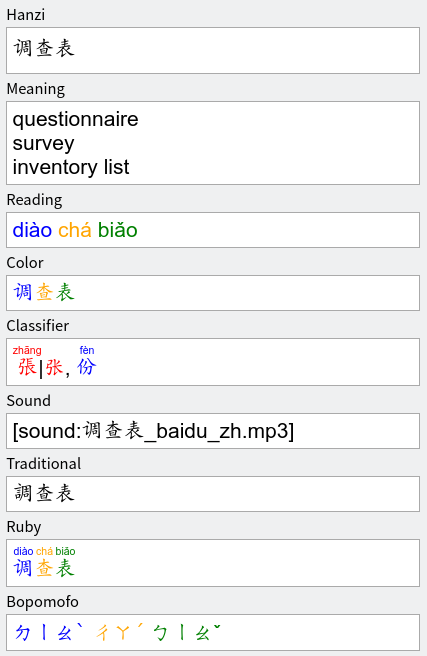
Downloading Chinese Language Support for Anki
To add Chinese language support to Anki, you need to ensure the necessary resources are installed. Follow these steps:
- Open Anki and go to Tools > Add-ons > Get Add-ons.
- Search for Chinese support or enter the add-on code (e.g., 1342155231 for Chinese Support Redux).
- Click OK to install and restart Anki to apply changes.
Installing Chinese Fonts for Proper Display
Proper Chinese character display requires compatible fonts. Here’s how to set them up:
- Download a Chinese font like Noto Sans CJK or SimSun from a trusted source.
- Install the font on your system (Windows/macOS/Linux).
- In Anki, go to Preferences > Appearance and select the installed font under Default Font.
Adding Chinese Decks or Creating Your Own
You can either download pre-made Chinese decks or create custom ones:
- For pre-made decks, go to AnkiWeb and search for Chinese vocabulary or HSK decks.
- To create a deck, click Create Deck, then Add new cards with Chinese characters, Pinyin, and English translations.
- Use fields like Front (Chinese) and Back (Definition/Pinyin) for flashcards.
Configuring Pinyin and Audio for Chinese Cards
Enhance your cards with Pinyin and audio for better learning:
- Install the AwesomeTTS add-on for text-to-speech pronunciation.
- Use Pinyin Toolkit add-on to automatically generate Pinyin for Chinese characters.
- Manually add audio by recording or importing files from resources like Forvo.
Syncing Anki with Chinese Study Tools
Integrate Anki with other Chinese learning tools for efficiency:
- Use Pleco or Hanping to export vocabulary lists to Anki.
- Enable AnkiWeb sync to access your decks across devices.
- Pair with language apps like Duolingo or HelloChinese for supplementary practice.
Frequently Asked Questions (FAQ)
What are the benefits of using audio flashcards for Chinese dictation practice?
Audio flashcards provide an immersive and effective way to practice Chinese dictation, helping learners improve their listening comprehension, character recognition, and writing accuracy. By hearing the pronunciation and then writing the corresponding characters, users reinforce both auditory and visual memory. The spaced repetition system in Anki ensures long-term retention, making it easier to recall vocabulary and characters over time.
How do I create free and easy audio flashcards for Chinese dictation in Anki?
To create free audio flashcards, you can use tools like Anki's built-in recording feature or external text-to-speech (TTS) services to generate audio files. First, prepare a list of Chinese words or sentences you want to practice. Then, add the audio to the front of the flashcard and the corresponding characters or Pinyin on the back. For an easier process, consider using pre-made Anki decks designed for Chinese dictation, which often include high-quality audio.
Can I customize the audio flashcards to match my learning level?
Yes, Anki allows full customization of flashcards to suit your learning level. You can adjust the difficulty by selecting simpler or more complex vocabulary, modifying the speed of the audio, or even adding hints like Pinyin or English translations. Additionally, Anki's spaced repetition algorithm adapts to your progress, showing cards more or less frequently based on your performance.
Are there any pre-made Anki decks available for Chinese dictation practice?
Absolutely! Many pre-made Anki decks are available for Chinese dictation practice, often including audio recordings of native speakers. Websites like AnkiWeb or community forums offer decks tailored for different proficiency levels, from beginner to advanced. These decks save time and provide high-quality content, ensuring you focus on practice rather than creation. Always check reviews or sample cards to ensure the deck meets your needs.
Leave a Reply
Related Posts