
Duolingo Classroom Setup: Easy Setup for Language Teachers


Duolingo Classroom Setup offers language teachers a streamlined and efficient way to integrate technology into their teaching practices. Designed with educators in mind, this tool simplifies the process of creating and managing virtual classrooms, making it accessible even for those with limited technical expertise. By leveraging Duolingo’s engaging and interactive language-learning platform, teachers can assign lessons, track student progress, and provide personalized feedback—all within a user-friendly interface. Whether you’re teaching beginners or advanced learners, Duolingo Classroom Setup enhances the learning experience while saving valuable time. This guide will walk you through the easy steps to get started and maximize its potential in your language classroom.
Duolingo Classroom Setup: Easy Setup for Language Teachers
Duolingo Classroom is a powerful tool designed to help language teachers integrate technology into their lessons seamlessly. With its user-friendly interface and engaging content, it allows educators to create a structured learning environment for their students. Below, we’ll explore how to set up Duolingo Classroom and make the most of its features.
1. Creating a Duolingo Classroom Account
To get started, teachers need to create a Duolingo Classroom account. Visit the Duolingo for Schools website and sign up using your existing Duolingo account or create a new one. Once registered, you can set up your classroom by adding students and assigning courses. This process is straightforward and ensures that you can monitor your students' progress effectively.
See AlsoHow to Use Flexi Classes || A Quick (& Simple) Guide2. Adding Students to Your Classroom
After setting up your account, the next step is to add students to your classroom. You can do this by sharing a unique classroom code with your students or by manually entering their email addresses. This feature allows you to keep track of their progress and tailor lessons to their needs. Duolingo Classroom also supports bulk uploads, making it easier to add multiple students at once.
3. Assigning Lessons and Tracking Progress
One of the key features of Duolingo Classroom is the ability to assign lessons and track student progress. Teachers can select specific lessons or units from Duolingo’s extensive library and assign them to their students. The platform provides detailed analytics, including time spent on tasks, accuracy, and completion rates, helping teachers identify areas where students may need additional support.
4. Customizing Learning Paths
Duolingo Classroom allows teachers to customize learning paths based on their students' proficiency levels and learning goals. You can choose from a variety of courses and adjust the difficulty level to suit your classroom’s needs. This flexibility ensures that students remain engaged and challenged, fostering a more effective learning experience.
See Also15 Interesting Facts About Chinese Culture5. Integrating Duolingo Classroom with Other Tools
For a more comprehensive teaching approach, Duolingo Classroom can be integrated with other educational tools such as Google Classroom or Microsoft Teams. This integration simplifies the process of managing assignments and communicating with students. Additionally, Duolingo’s gamified approach keeps students motivated, making language learning more enjoyable.
| Feature | Description |
|---|---|
| Classroom Code | Unique code for students to join the classroom. |
| Progress Tracking | Detailed analytics on student performance. |
| Custom Lessons | Ability to assign specific lessons tailored to student needs. |
| Integration | Compatibility with tools like Google Classroom and Microsoft Teams. |
| Gamification | Engaging, game-like elements to motivate students. |
How can teachers use Duolingo in the classroom?
Integrating Duolingo into Lesson Plans
Teachers can effectively integrate Duolingo into their lesson plans by aligning the app's content with their curriculum. This ensures that students are practicing relevant vocabulary and grammar structures. Here are some steps to achieve this:
See AlsoLotus Root Stuffed With Glutinous Rice- Identify key topics in your curriculum that Duolingo covers, such as basic greetings, numbers, or verb conjugations.
- Assign specific lessons on Duolingo that match the current unit of study, ensuring students practice what they are learning in class.
- Track progress using Duolingo's teacher dashboard to monitor student engagement and comprehension.
Using Duolingo for Homework Assignments
Duolingo can be a valuable tool for homework assignments, allowing students to practice language skills outside the classroom. Here’s how teachers can use it effectively:
- Set daily or weekly goals for students to complete a certain number of lessons or earn a specific number of XP points.
- Encourage consistency by assigning short, manageable tasks that fit into students' schedules.
- Review progress in class to discuss challenges and celebrate achievements.
Enhancing Speaking and Listening Skills
Duolingo offers speaking and listening exercises that can help students improve their pronunciation and comprehension. Teachers can leverage these features in the following ways:
- Incorporate speaking exercises into classroom activities, such as repeating phrases or answering questions aloud.
- Use listening exercises to train students' ears to recognize different accents and speech patterns.
- Pair Duolingo practice with real-life conversations to reinforce learning.
Gamifying Language Learning
Duolingo's gamified approach can make language learning more engaging for students. Teachers can use this to their advantage by:
See AlsoChinese reading speed: Learning how to read ten lines at a glance- Creating friendly competitions among students to see who can earn the most XP or complete the most lessons.
- Rewarding achievements with certificates or small prizes to motivate students.
- Encouraging teamwork by forming groups where students can support each other's progress.
Assessing Student Progress with Duolingo
Duolingo provides tools for teachers to assess student progress and identify areas for improvement. Here’s how to use these tools effectively:
- Monitor completion rates of lessons to ensure students are keeping up with assignments.
- Analyze performance data to identify common mistakes or topics that need further review.
- Provide personalized feedback based on Duolingo's reports to help students improve.
How do you start a classroom on Duolingo?
Creating a Duolingo Classroom Account
To start a classroom on Duolingo, you first need to create a Duolingo for Schools account. This is a specialized platform designed for educators. Follow these steps:
See AlsoAre you practising Chinese the right way? Is your method valid?- Visit the Duolingo for Schools website and click on the Get Started button.
- Sign up using your email address or link your existing Duolingo account.
- Fill in the required details, such as your name, school, and the language you plan to teach.
- Verify your account through the confirmation email sent to your inbox.
Setting Up Your Classroom
Once your account is verified, you can begin setting up your classroom. This involves creating a virtual space for your students. Here’s how:
- Log in to your Duolingo for Schools account.
- Click on the Create a Classroom option.
- Name your classroom and select the language your students will learn.
- Choose the appropriate age group for your students to tailor the content.
Inviting Students to Join
After setting up your classroom, the next step is to invite your students. Duolingo provides multiple ways to do this:
- Generate a unique classroom code and share it with your students.
- Send an email invitation directly from the platform.
- Provide a link that students can click to join the classroom.
- Ensure students create their own Duolingo accounts if they don’t already have one.
Assigning Lessons and Tracking Progress
Duolingo for Schools allows you to assign specific lessons and monitor student progress. Here’s how to make the most of this feature:
- Navigate to the Assignments tab in your classroom dashboard.
- Select the lessons or skills you want your students to focus on.
- Set deadlines or goals for completing assignments.
- Use the Progress Tracker to view individual and class performance.
Customizing the Learning Experience
Duolingo offers tools to customize the learning experience for your classroom. This ensures the content aligns with your teaching objectives:
- Adjust the difficulty level of lessons based on your students’ proficiency.
- Enable or disable specific features, such as leaderboards, to suit your classroom environment.
- Incorporate additional resources or activities outside of Duolingo to complement the lessons.
- Regularly review and update your classroom settings to keep the experience engaging.
How many students can be in a Duolingo classroom?
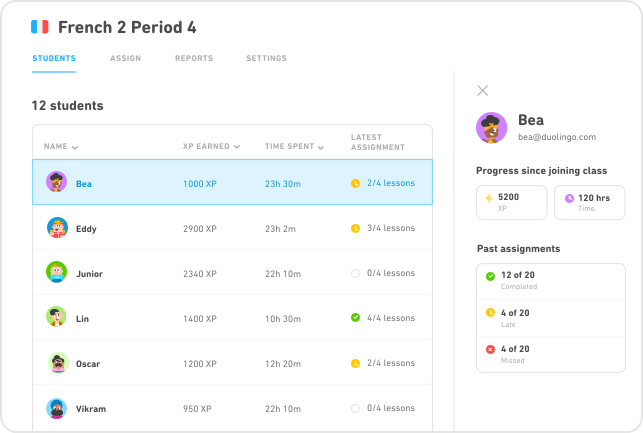
What is the Maximum Number of Students in a Duolingo Classroom?
The maximum number of students that can be added to a Duolingo classroom is 50 students. This limit is set to ensure that teachers can effectively manage and monitor the progress of their students. Duolingo classrooms are designed to provide a structured learning environment, and this cap helps maintain a balance between accessibility and functionality.
- 50 students is the upper limit for a single classroom.
- Teachers can create multiple classrooms if they have more students.
- This limit ensures better engagement and tracking of student progress.
Why Does Duolingo Limit Classroom Size?
Duolingo limits classroom size to 50 students to ensure that teachers can provide personalized attention and effectively track each student's progress. A smaller classroom size helps maintain a high-quality learning experience and prevents the platform from becoming overwhelming for educators.
- Smaller classrooms allow for better student-teacher interaction.
- It ensures that progress tracking remains accurate and manageable.
- Prevents the platform from being overloaded with too many users in one space.
Can Teachers Create Multiple Classrooms on Duolingo?
Yes, teachers can create multiple classrooms on Duolingo if they have more than 50 students. This feature allows educators to organize their students into smaller, more manageable groups while still utilizing the platform's tools for tracking and assignments.
- Teachers can create as many classrooms as needed.
- Each classroom can have up to 50 students.
- This flexibility helps accommodate larger groups of learners.
How Does Duolingo Handle Large Groups of Students?
For large groups of students, Duolingo allows teachers to create multiple classrooms. This approach ensures that the platform remains functional and that teachers can effectively manage their students' learning progress without exceeding the 50-student limit per classroom.
- Teachers can divide students into smaller groups.
- Each group operates as a separate classroom.
- This method maintains the platform's efficiency and usability.
What Are the Benefits of a 50-Student Limit in Duolingo Classrooms?
The 50-student limit in Duolingo classrooms offers several benefits, including better management of student progress, improved engagement, and a more personalized learning experience. This limit ensures that teachers can focus on individual students while maintaining a structured and organized classroom environment.
- Enables effective progress tracking for each student.
- Promotes a more engaging and interactive learning experience.
- Helps teachers provide personalized feedback and support.
Is Duolingo good at teaching a language?
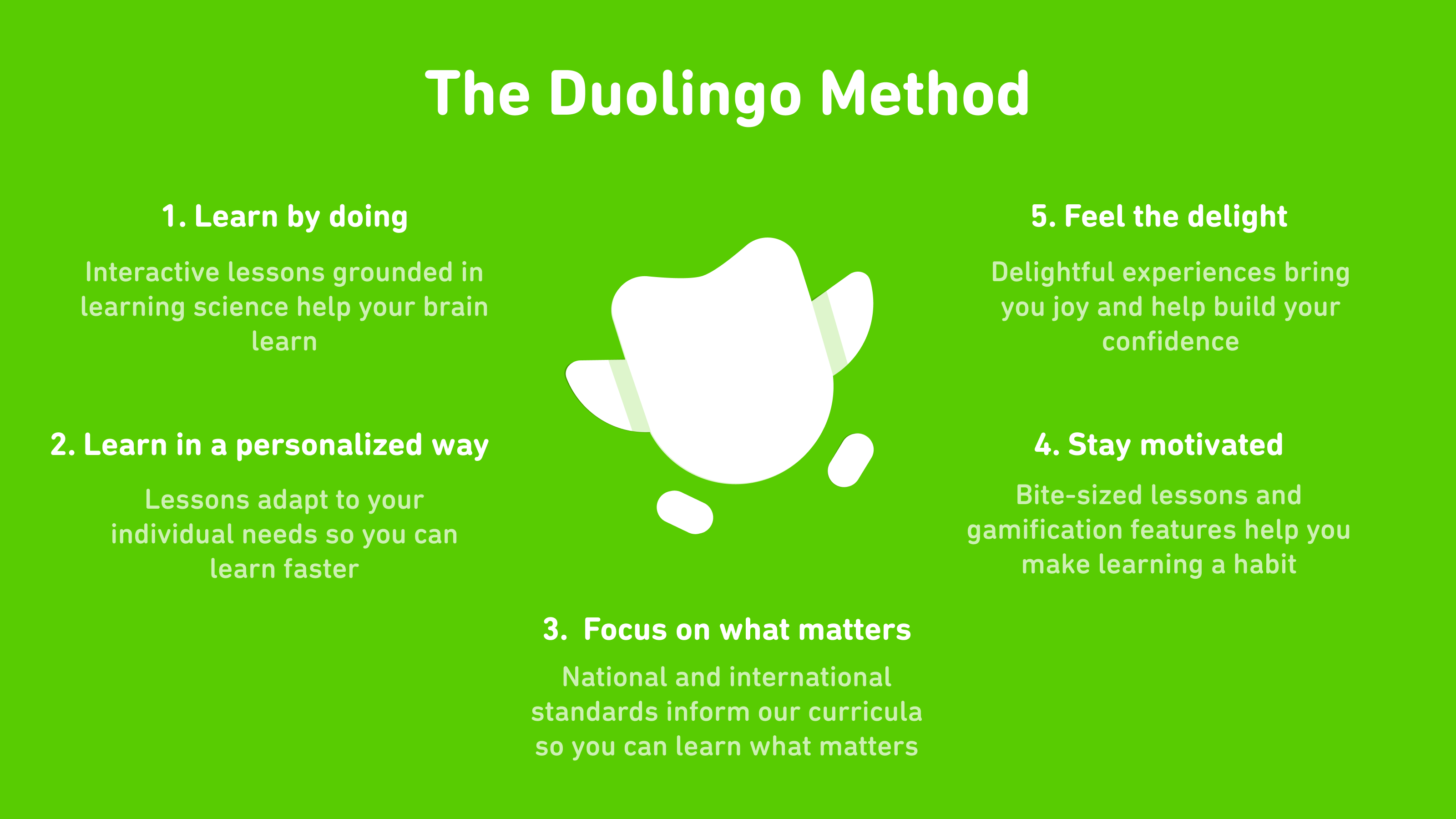
What Makes Duolingo Effective for Language Learning?
Duolingo is effective for language learning due to its gamified approach, which keeps users engaged and motivated. The app uses a combination of visuals, audio, and interactive exercises to reinforce learning. Additionally, its spaced repetition system ensures that users revisit and retain vocabulary and grammar over time.
- Gamification: Points, streaks, and levels make learning feel like a game.
- Interactive Exercises: Includes listening, speaking, and translation tasks.
- Spaced Repetition: Helps reinforce long-term memory retention.
Does Duolingo Cover All Aspects of Language Learning?
While Duolingo is strong in teaching vocabulary and basic grammar, it has limitations in covering advanced grammar, cultural context, and conversational fluency. The app focuses more on reading and writing than on speaking and listening, which are crucial for real-world communication.
- Vocabulary and Grammar: Excellent for beginners and intermediate learners.
- Conversational Skills: Limited practice in real-life dialogues.
- Cultural Context: Minimal focus on cultural nuances.
How Does Duolingo Compare to Traditional Language Classes?
Duolingo offers flexibility and accessibility, making it a convenient alternative to traditional classes. However, it lacks the personalized feedback and structured curriculum that a classroom setting provides. Traditional classes also offer more opportunities for interaction and immersion.
- Flexibility: Learn anytime, anywhere.
- Feedback: Limited compared to a teacher’s guidance.
- Interaction: Less opportunity for live conversation practice.
Is Duolingo Suitable for Advanced Learners?
Duolingo is less effective for advanced learners who need to focus on complex grammar, nuanced vocabulary, and fluency. The app’s content is primarily designed for beginners and intermediate learners, and it may not challenge advanced users enough.
- Beginner-Friendly: Ideal for foundational learning.
- Intermediate Level: Useful for building basic proficiency.
- Advanced Limitations: Lacks depth for higher-level skills.
What Are the Pros and Cons of Using Duolingo?
Duolingo has several advantages, such as being free, user-friendly, and engaging. However, it also has drawbacks, including a lack of depth in advanced topics and limited opportunities for real-world practice.
- Pros: Free, accessible, and fun to use.
- Cons: Limited advanced content and real-world application.
- Balance: Best used as a supplementary tool.
Frequently Asked Questions From our Community
What is Duolingo Classroom Setup and how does it benefit language teachers?
Duolingo Classroom Setup is a feature designed to help language teachers integrate Duolingo into their teaching environment. It allows educators to create virtual classrooms, track student progress, and assign specific lessons or activities. This setup is particularly beneficial because it provides a structured and interactive way for students to practice language skills outside of traditional classroom hours. Teachers can monitor individual performance, identify areas where students may need additional support, and tailor their instruction accordingly. By using Duolingo Classroom Setup, teachers can enhance their curriculum with a gamified learning experience that keeps students engaged and motivated.
How do I set up a Duolingo Classroom for my students?
Setting up a Duolingo Classroom is a straightforward process. First, you need to create a teacher account on Duolingo for Schools. Once your account is set up, you can create a new classroom by clicking on the Create a Classroom button. You will then be prompted to add your students by either sharing a unique classroom code or importing a list of student emails. After your students join, you can start assigning lessons, tracking their progress, and accessing detailed reports. The platform is designed to be user-friendly, making it easy for teachers to manage their classrooms efficiently.
Can I customize assignments for different student levels in Duolingo Classroom?
Yes, one of the key features of Duolingo Classroom Setup is the ability to customize assignments based on individual student levels. Teachers can assign specific lessons, skills, or even entire courses to match the proficiency level of each student. This flexibility ensures that advanced learners are challenged while beginners receive the foundational support they need. Additionally, Duolingo's adaptive learning technology adjusts the difficulty of exercises based on student performance, providing a personalized learning experience for everyone in the classroom.
What kind of progress tracking tools are available for teachers in Duolingo Classroom?
Duolingo Classroom offers a variety of progress tracking tools to help teachers monitor student performance. Teachers can access detailed reports that show how much time students have spent on the platform, which lessons they have completed, and their overall proficiency levels. The platform also provides insights into areas where students may be struggling, allowing teachers to offer targeted support. Additionally, Duolingo's gamification elements, such as streaks and XP points, are visible in the classroom dashboard, giving teachers a quick overview of student engagement and motivation. These tools make it easier for educators to assess progress and adjust their teaching strategies as needed.
Leave a Reply
Related Posts