
Duolingo Classroom Code: Free Teacher & Student Setup Guide 2025

Duolingo has become a go-to platform for language learners worldwide, and its Classroom feature offers educators a powerful tool to enhance student engagement. The Duolingo Classroom Code simplifies the process of connecting teachers and students, enabling seamless integration of language learning into educational settings. This guide provides a step-by-step walkthrough for setting up a Duolingo Classroom in 2025, ensuring both teachers and students can maximize the platform’s potential. From creating a classroom to generating unique codes, this resource covers everything needed to get started. Whether you’re an educator or a student, this guide will help you navigate Duolingo’s Classroom feature with ease.
Duolingo Classroom Code: Free Teacher & Student Setup Guide 2025
What is a Duolingo Classroom Code?
A Duolingo Classroom Code is a unique identifier that allows teachers to create and manage virtual classrooms on the Duolingo platform. This code enables students to join the classroom, access assigned lessons, and track their progress. It is a free tool designed to facilitate language learning in an organized and structured manner, making it ideal for educators and students alike.
How to Create a Duolingo Classroom Code for Teachers
To create a Duolingo Classroom Code, teachers need to follow these steps:
1. Sign up or log in to Duolingo for Schools.
2. Navigate to the Classroom section and click on Create a Classroom.
3. Fill in the required details, such as the class name and language.
4. Generate a unique Classroom Code and share it with students.
| Step | Action |
|---|---|
| 1 | Sign up or log in to Duolingo for Schools |
| 2 | Click on Create a Classroom |
| 3 | Fill in class details |
| 4 | Generate and share the Classroom Code |
How Students Can Join a Duolingo Classroom
Students can join a Duolingo Classroom by entering the Classroom Code provided by their teacher. Here’s how:
1. Log in to their Duolingo account or create one if they don’t have it.
2. Go to the Schools section and click on Join a Classroom.
3. Enter the Classroom Code and start accessing assigned lessons.
| Step | Action |
|---|---|
| 1 | Log in or create a Duolingo account |
| 2 | Click on Join a Classroom |
| 3 | Enter the Classroom Code |
Benefits of Using Duolingo Classroom for Teachers
Using Duolingo Classroom offers numerous benefits for teachers, including:
- Tracking student progress in real-time.
- Assigning customized lessons based on individual needs.
- Access to free educational resources and tools.
- Enhancing student engagement through gamified learning.
| Benefit | Description |
|---|---|
| Progress Tracking | Monitor student performance in real-time |
| Customized Lessons | Tailor lessons to meet individual needs |
| Free Resources | Access educational tools at no cost |
| Gamified Learning | Boost engagement through interactive activities |
Tips for Maximizing Duolingo Classroom in 2025
To make the most of Duolingo Classroom in 2025, consider the following tips:
- Regularly update Classroom Codes for security.
- Encourage students to complete daily challenges.
- Use the analytics dashboard to identify areas for improvement.
- Integrate Duolingo with other teaching tools for a comprehensive learning experience.
| Tip | Action |
|---|---|
| Update Codes | Change Classroom Codes periodically |
| Daily Challenges | Motivate students to complete daily tasks |
| Analytics Dashboard | Use data to improve teaching strategies |
| Integration | Combine Duolingo with other tools |
How to get a Duolingo classroom code?
What is a Duolingo Classroom Code?
A Duolingo Classroom Code is a unique identifier that allows teachers to create and manage virtual classrooms on Duolingo. This code enables students to join a specific classroom, track their progress, and access assignments set by their teacher. It is an essential tool for educators using Duolingo for Schools.
How to Create a Duolingo Classroom
To create a Duolingo classroom and obtain a classroom code, follow these steps:
See AlsoHow I Almost Forgot Chinese and Then Relearned It All Over Again- Sign in to your Duolingo for Schools account or create one if you don’t have it.
- Click on the Create a Classroom button on the dashboard.
- Fill in the required details, such as the classroom name and language being taught.
- Once the classroom is created, a unique Classroom Code will be generated automatically.
Where to Find Your Duolingo Classroom Code
After creating a classroom, you can locate your Classroom Code by following these steps:
- Go to your Duolingo for Schools dashboard.
- Select the classroom you want to manage.
- Look for the Classroom Code displayed at the top of the page or in the settings section.
Sharing your Duolingo Classroom Code with students is simple. Here’s how:
- Provide the code directly to your students via email, messaging apps, or in-person instructions.
- Ask students to visit the Duolingo website or app and click on Join a Classroom.
- Students will need to enter the Classroom Code to join your virtual classroom.
What to Do If You Lose Your Duolingo Classroom Code
If you lose or forget your Duolingo Classroom Code, follow these steps to retrieve it:
See AlsoAI Language Learning: 6 Reasons it Doesn't Work- Log in to your Duolingo for Schools account.
- Navigate to the specific classroom you need the code for.
- The Classroom Code will be visible in the classroom settings or dashboard.
- If you still can’t find it, contact Duolingo Support for assistance.
Do teachers get Duolingo for free?
Do Teachers Get Free Access to Duolingo?
Teachers do not automatically get free access to Duolingo's premium features. However, Duolingo offers a program called Duolingo for Schools, which is a free platform designed specifically for educators. This program allows teachers to track their students' progress, assign lessons, and manage classrooms without needing a premium subscription. While it doesn't include all the features of Duolingo Plus, it provides valuable tools for educational purposes.
- Duolingo for Schools is free for educators.
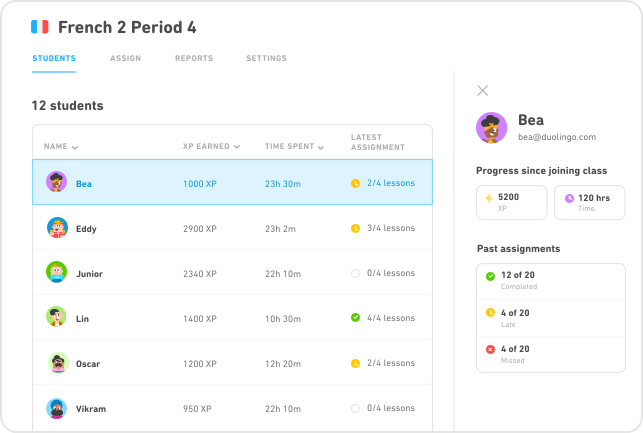
- Teachers can track student progress and assign lessons.
- It does not include premium features like offline access or ad-free learning.
What is Duolingo for Schools?
Duolingo for Schools is a specialized platform tailored for educators to integrate language learning into their classrooms. It provides tools to monitor student performance, customize assignments, and create a structured learning environment. This platform is entirely free and does not require a Duolingo Plus subscription.
See AlsoDo you have to learn to write Chinese characters by hand?- It is designed specifically for classroom use.
- Teachers can create and manage student accounts.
- It offers insights into student progress and engagement.
Can Teachers Use Duolingo Plus for Free?
Teachers do not receive Duolingo Plus for free unless they purchase a subscription or participate in special promotions. Duolingo Plus offers additional features like ad-free learning, offline access, and unlimited hearts, but these are not included in the free Duolingo for Schools program.
- Duolingo Plus requires a paid subscription.
- Special promotions may occasionally offer free trials.
- Teachers can still use the free version for classroom activities.
How to Sign Up for Duolingo for Schools
To sign up for Duolingo for Schools, teachers need to create an account on the Duolingo website and register as an educator. The process is straightforward and involves verifying their teaching credentials. Once registered, they can start setting up their classrooms and inviting students to join.
- Visit the Duolingo for Schools website.
- Register as an educator and verify your credentials.
- Set up your classroom and invite students.
What Are the Limitations of Duolingo for Schools?
While Duolingo for Schools is a powerful tool for educators, it has some limitations. It does not include premium features like offline access or ad-free learning, which are available in Duolingo Plus. Additionally, the platform is primarily designed for language learning and may not cover other subjects.
- No access to Duolingo Plus features.
- Limited to language learning content.
- Requires an internet connection for use.
How do I set up a classroom on Duolingo?
Creating a Duolingo Classroom Account
To set up a classroom on Duolingo, you first need to create a Duolingo for Schools account. This is a specialized platform designed for educators to manage students and track their progress. Follow these steps:
- Visit the Duolingo for Schools website and click on Get Started.
- Sign up using your email address or link your existing Duolingo account.
- Select the option for I'm a Teacher to access classroom features.
- Fill in your school details and verify your educator status if required.
Adding Students to Your Classroom
Once your account is set up, you can start adding students to your classroom. This process is straightforward and ensures students can access the platform easily.
- Navigate to the Classroom tab in your Duolingo for Schools dashboard.
- Click on Add Students and choose between creating individual accounts or sharing a classroom code.
- If using a code, share it with your students so they can join your classroom.
- For younger students, you can create accounts on their behalf by entering their names and email addresses.
Customizing Classroom Settings
Duolingo allows you to customize your classroom settings to suit your teaching needs. This includes setting language goals and managing student progress.
- Go to the Settings section of your classroom dashboard.
- Choose the target language for your students to learn.
- Set daily or weekly XP goals to motivate students.
- Enable or disable features like leaderboards based on your classroom dynamics.
Assigning Lessons and Tracking Progress
Duolingo for Schools provides tools to assign specific lessons and monitor student progress effectively.
- Use the Assignments feature to select lessons or skills for your students to complete.
- Track progress through the Progress tab, which shows individual and class-wide achievements.
- Review detailed reports on student activity, including time spent and skills mastered.
- Provide feedback or adjust assignments based on student performance.
Engaging Students with Duolingo Features
Duolingo offers interactive features to keep students engaged and motivated throughout their learning journey.
- Encourage students to earn XP and unlock achievements to stay motivated.
- Use Duolingo Stories or Podcasts for advanced learners to enhance comprehension.
- Organize friendly competitions using the leaderboard feature.
- Celebrate milestones and progress with your students to maintain enthusiasm.
Frequently Asked Questions From our Community
What is a Duolingo Classroom Code and how does it work?
A Duolingo Classroom Code is a unique identifier that allows teachers to create and manage virtual classrooms on the Duolingo platform. This code enables educators to invite students to join their classroom, track their progress, and assign specific lessons or activities. Once the teacher generates the code, students can enter it on their Duolingo accounts to link themselves to the classroom. This system is designed to make language learning more structured and collaborative, especially in educational settings.
How can teachers set up a Duolingo Classroom for free in 2025?
Setting up a Duolingo Classroom for free in 2025 is a straightforward process. Teachers need to sign up for a Duolingo for Schools account, which is specifically designed for educators. After creating an account, they can generate a Classroom Code and share it with their students. The platform provides tools to monitor student progress, customize assignments, and access detailed reports. This setup is entirely free and does not require any premium subscriptions, making it accessible for educators worldwide.
Can students join a Duolingo Classroom without a code?
No, students cannot join a Duolingo Classroom without a valid Classroom Code. The code acts as a secure link between the teacher's classroom and the student's account. Without it, students cannot access the specific assignments or progress tracking features associated with the classroom. Teachers must ensure that the code is shared securely and only with intended participants to maintain the integrity of the classroom environment.
What are the benefits of using Duolingo Classroom for language learning?
Using a Duolingo Classroom offers numerous benefits for both teachers and students. For teachers, it provides a centralized platform to manage lessons, track student progress, and tailor assignments to individual needs. Students benefit from a structured learning environment, access to gamified lessons, and the ability to compete or collaborate with classmates. Additionally, the platform's adaptive learning technology ensures that lessons are personalized, making language acquisition more effective and engaging.
Leave a Reply
Related Posts