
Pleco (App Review) - Update On The Chinese Dictionary

Pleco remains one of the most powerful and versatile Chinese dictionary apps available, continually evolving to meet the needs of learners at all levels. With its latest update, the app introduces enhanced features, including improved OCR capabilities, expanded dictionary entries, and smoother integration with other learning tools. Whether you're a beginner tackling basic vocabulary or an advanced student deciphering complex texts, Pleco offers an indispensable resource. Its user-friendly interface, offline functionality, and customizable flashcards make it a favorite among Mandarin enthusiasts. This review explores the recent updates, highlighting how Pleco continues to set the standard for Chinese language learning apps, ensuring efficiency and accuracy for every user.
Pleco App Review: Latest Updates on the Premier Chinese Dictionary
What's New in the Latest Pleco Update?
The latest Pleco update introduces several enhancements, including improved OCR accuracy, expanded flashcard functionality, and a more intuitive user interface. The dictionary database has also been updated with additional vocabulary entries and example sentences, making it even more valuable for Chinese learners.
| Feature | Improvement |
|---|---|
| OCR | Higher accuracy in text recognition |
| Flashcards | New spaced repetition algorithms |
| Dictionary | Added 5,000+ new entries |
How Does Pleco Compare to Other Chinese Learning Apps?
Pleco stands out due to its comprehensive dictionary, offline functionality, and customizable flashcards. Unlike competitors, it offers stroke order animations, handwriting recognition, and professional-grade add-ons such as CC-CEDICT and Tuttle dictionaries.
See AlsoHSK 5 Vocabulary Test - Quick (+ Full) Quizzes Available| Feature | Pleco | Other Apps |
|---|---|---|
| Offline Use | ✓ Full functionality | ✗ Often limited |
| Flashcards | ✓ Highly customizable | ✗ Basic options |
Is Pleco Worth the Paid Add-Ons?
While the free version of Pleco is robust, the paid add-ons significantly enhance its utility. The OCR module, extended dictionaries, and audio pronunciations are particularly valuable for serious learners.
| Add-On | Price | Benefit |
|---|---|---|
| OCR | $9.99 | Scan printed Chinese text |
| Audio Pack | $4.99 | Native speaker pronunciations |
How Effective Is Pleco for Beginners vs. Advanced Learners?
Pleco caters to all proficiency levels. Beginners benefit from pinyin support and basic flashcards, while advanced learners utilize sentence breakdowns, classical Chinese dictionaries, and HSK vocabulary lists.
| Level | Key Features |
|---|---|
| Beginners | Pinyin, stroke order, basic flashcards |
| Advanced | Classical Chinese, HSK lists, sentence analysis |
What Are the Pros and Cons of Using Pleco?
Pleco excels in accuracy and customization, but some users find the interface outdated and certain features require add-ons.
See AlsoThe 10 best free Chinese listening resources for beginner, intermediate and advanced learners| Pros | Cons |
|---|---|
| Offline use | UI could be modernized |
| Extensive dictionaries | Some features are paid |
Does Pleco have traditional Chinese?

Does Pleco Support Traditional Chinese Characters?
Yes, Pleco fully supports Traditional Chinese characters. The app includes dictionaries, flashcards, and reading materials in both Traditional and Simplified Chinese, allowing users to switch between them based on preference or learning needs.
- Dictionary support: Pleco offers multiple dictionaries that display entries in Traditional Chinese.
- Character conversion: Users can toggle between Traditional and Simplified Chinese in most features.
- Flashcards: Flashcards can be customized to display either character set.
How to Switch Between Traditional and Simplified Chinese in Pleco?
Changing the character display in Pleco is straightforward. The app provides settings to adjust the script type for dictionaries, flashcards, and other tools.
See AlsoBest 10 Free Chinese Reading Materials for Beginners to Learn to Read Mandarin- Dictionary settings: Navigate to the dictionary settings and select your preferred script.
- Flashcard settings: Customize card formats to show Traditional or Simplified characters.
- Reader tool: The built-in reader allows switching scripts for imported texts.
Which Pleco Dictionaries Include Traditional Chinese?
Many of Pleco's dictionaries support Traditional Chinese, including popular ones like CC-CEDICT, ABC, and PLC.
- CC-CEDICT: A free, comprehensive dictionary with Traditional entries.
- ABC Chinese-English Dictionary: Offers high-quality Traditional character support.
- PLC Dictionary: Focuses on both scripts with detailed explanations.
Can Pleco Convert Simplified to Traditional Chinese?
Yes, Pleco includes a conversion tool that allows users to switch between Simplified and Traditional Chinese seamlessly.
- Clipboard reader: Converts copied text between scripts instantly.
- Document reader: Supports script conversion for imported files.
- Manual input: Users can type in one script and see the other as an option.
Does Pleco Offer Traditional Chinese Flashcards?
Pleco's flashcard system fully accommodates Traditional Chinese, letting learners focus on this script if desired.
See Also5 websites to help answer your questions about Chinese- Custom decks: Users can create or download decks in Traditional Chinese.
- Script toggle: Flashcards can display either script or both for comparison.
- Testing options: Quizzes can be set to recognize Traditional characters exclusively.
Is pleco chinese dictionary free?
Is the Pleco Chinese Dictionary Free to Use?
The Pleco Chinese Dictionary offers a free basic version with essential features, including a reliable dictionary, flashcards, and OCR text recognition. However, advanced functionalities require paid add-ons.
- The free version includes core dictionary entries from CC-CEDICT.
- Additional dictionaries like Oxford or Tuttle require in-app purchases.
- Advanced tools such as full-screen handwriting or document reader are paid features.
What Features Are Included in the Free Version of Pleco?
The free tier of Pleco provides fundamental tools for learners, though with limitations.
See AlsoChinese language learning in the twenty-first century: Towards a digital ecosystem? Interview with Julien Leyre- Basic dictionary lookup with example sentences.
- Flashcard system for vocabulary practice.
- OCR text recognition (limited to 10 scans per day).
Which Paid Add-Ons Are Available in Pleco?
Pleco offers several premium upgrades to enhance functionality.
- Professional dictionaries (e.g., PLC, Guifan).
- Extended OCR for unlimited scans.
- Stroke order diagrams and audio pronunciations.
How Does Pleco Compare to Other Free Chinese Dictionaries?
Pleco stands out due to its offline usability and comprehensive features, even in the free version.
- No ads in the free version, unlike some competitors.
- Offline access to dictionary entries.
- Customizable flashcards with SRS (Spaced Repetition System).
Can You Use Pleco Without Paying Anything?
Yes, the free version of Pleco is fully functional for basic learning needs.
- No subscription is required for core features.
- Optional purchases only for specialized content.
- Lifetime updates for the base app at no cost.
How do I add dictionaries to Pleco?
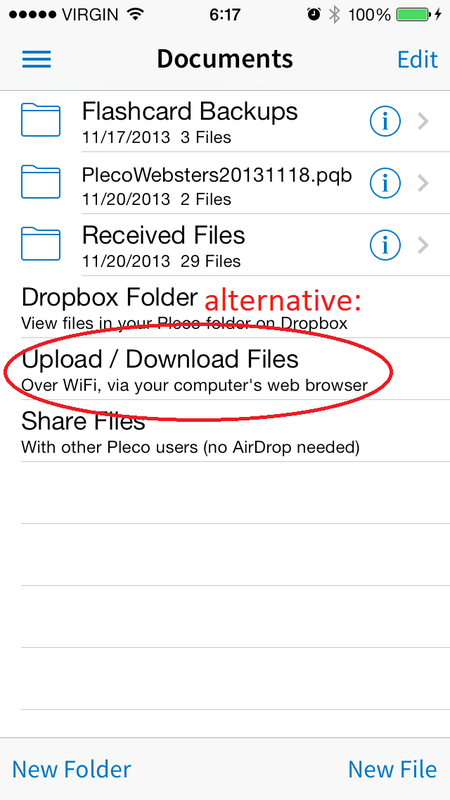
How to Download Dictionaries in Pleco
To download dictionaries in Pleco, follow these steps:
- Open the Pleco app on your device.
- Tap the three-line menu icon in the top-left corner.
- Select Add-ons from the dropdown menu.
- Choose Dictionaries to view available options.
- Browse or search for the desired dictionary and tap Download.
How to Install Purchased Dictionaries in Pleco
If you've purchased a dictionary, here’s how to install it:
- Ensure you’re logged into the same Pleco account used for purchase.
- Go to Add-ons > Dictionaries in the app.
- Find the dictionary and tap Install (it should show as purchased).
- Wait for the download to complete; it will appear in your dictionary list.
How to Enable or Disable Dictionaries in Pleco
To manage active dictionaries in Pleco:
- Navigate to Settings > Dictionaries in the app.
- Tap Dictionary Order to rearrange priority.
- Toggle the switch next to each dictionary to enable or disable it.
- Changes apply automatically; disabled dictionaries won’t appear in searches.
How to Add Custom Dictionaries to Pleco
For user-created or third-party dictionaries, follow these steps:
- Obtain the dictionary file in .pleco or .txt format.
- Transfer it to your device (via email, cloud storage, or USB).
- In Pleco, go to Add-ons > Dictionaries > User.
- Tap Import and select the file to add it.
How to Update Dictionaries in Pleco
To ensure you have the latest dictionary versions:
- Open Pleco and go to Add-ons > Dictionaries.
- Look for an Update button next to installed dictionaries.
- Tap it to download the newest version (requires internet).
- Restart Pleco if prompted to apply updates.
Is Pleco a Chinese company?

Pleco is not a company but rather a popular Chinese-English dictionary and language-learning app. It was developed by Michael Love, an American software developer, and is primarily used by learners of Mandarin Chinese. While the app is widely used in China and focuses on the Chinese language, it is not owned or operated by a Chinese company.
- Pleco was created by an independent developer, not a corporate entity.
- The app is available globally but is especially popular among Mandarin learners.
- Despite its strong association with Chinese language learning, it is not affiliated with any Chinese government or business.
Who owns Pleco?
Pleco is owned and maintained by Michael Love, the original developer who launched the app in 2000. It operates as an independent project rather than under a larger corporate structure.
- Michael Love remains the primary developer and decision-maker for Pleco.
- The app has not been acquired by any Chinese or international company.
- Development and updates are handled by a small team, not a corporate entity.
Where is Pleco based?
Pleco is based in the United States, with its operations centered around its developer, Michael Love. Despite its focus on the Chinese language, it is not headquartered in China.
- The app’s development and business operations are U.S.-based.
- No physical offices or legal entities are registered in China.
- It serves a global audience, including users in China, the U.S., and other countries.
Does Pleco have ties to China?
While Pleco is deeply connected to the Chinese language and culture, it does not have formal ties to Chinese companies or the government. Its association with China is purely based on its linguistic focus.
- The app integrates Chinese dictionaries and learning tools but is not owned by a Chinese firm.
- It collaborates with Chinese publishers for dictionary content but remains independent.
- No evidence suggests Chinese government involvement in Pleco’s operations.
Is Pleco popular in China?
Pleco is widely used in China by students, expatriates, and professionals learning Mandarin. However, its popularity does not indicate Chinese ownership.
- Many Mandarin learners in China rely on Pleco for translations and flashcards.
- It competes with local apps like Youdao but remains a favorite among foreign learners.
- Despite its user base, Pleco remains an American-developed tool.
Frequently Asked Questions (FAQ)
What are the key features of the Pleco app for learning Chinese?
Pleco is a comprehensive Chinese dictionary and learning tool that offers a wide range of features. It includes offline access to multiple dictionaries, flashcards for vocabulary building, and OCR (Optical Character Recognition) to scan and translate text from images. The app also supports handwriting input, audio pronunciations by native speakers, and example sentences to contextualize words. Additionally, Pleco provides customizable flashcards with spaced repetition, making it an excellent resource for both beginners and advanced learners.
How does Pleco compare to other Chinese dictionary apps?
Pleco stands out due to its depth of content and user-friendly interface. Unlike many competitors, it offers offline functionality, which is crucial for learners without constant internet access. The app integrates multiple dictionaries, including specialized ones for medical, legal, and business terms. Its flashcard system is highly customizable, surpassing simpler systems in apps like Hanping or Dong Chinese. Pleco also supports add-ons for advanced features, giving users flexibility to tailor their experience.
Is Pleco suitable for beginners in Chinese?
Absolutely! Pleco is designed to cater to learners at all levels, including beginners. The app provides pinyin and English definitions for every entry, along with audio pronunciations to help with tones. Beginners can benefit from the flashcard system, which includes pre-made decks for HSK levels and basic vocabulary. The handwriting input feature is particularly useful for those just starting to learn Chinese characters, as it helps reinforce recognition and stroke order.
What are the benefits of the paid add-ons in Pleco?
While Pleco is free to download, its paid add-ons unlock advanced features that enhance the learning experience. The Professional Bundle includes high-quality dictionaries like ABC Chinese-English Comprehensive Dictionary and Guifan, which offer more detailed definitions and usage examples. The OCR add-on allows users to scan printed text, while the Flashcard System add-on provides advanced study modes and synchronization across devices. These add-ons are ideal for serious learners or professionals who need deeper linguistic resources.
Leave a Reply
Related Posts