
Learn How to Read Chinese Characters Using Apps

Learning to read Chinese characters can seem daunting, but modern technology has made it more accessible than ever. With the right apps, beginners and advanced learners alike can master Hanzi efficiently. These tools offer interactive lessons, flashcards, and real-time feedback to build recognition and comprehension. Many apps incorporate gamification, making the learning process engaging and motivating. Whether you're preparing for travel, business, or personal growth, these applications adapt to your pace and goals. From stroke order to pronunciation, they cover essential aspects of Chinese literacy. Discover how leveraging these digital resources can transform your journey into understanding one of the world’s oldest writing systems.
Learn How to Read Chinese Characters Using Apps: A Step-by-Step Guide
1. Why Use Apps to Learn Chinese Characters?
Learning Chinese characters can be challenging due to their complexity and sheer number. Apps provide an interactive, accessible, and structured way to master them. They offer features like stroke-order animations, flashcards, and spaced repetition, making the learning process efficient and engaging.
| Feature | Benefit |
|---|---|
| Stroke-order animations | Helps learn proper writing technique |
| Spaced repetition | Improves long-term retention |
| Audio pronunciations | Ensures correct tone and pronunciation |
2. Best Apps for Learning Chinese Characters
Several highly-rated apps specialize in teaching Chinese characters. Pleco, Skritter, and HelloChinese are among the top choices. These apps combine visual, auditory, and kinesthetic learning methods to reinforce character recognition and recall.
See AlsoHow To Improve Chinese Vocabulary Using Fast and Effective Methods| App | Key Feature |
|---|---|
| Pleco | Comprehensive dictionary with OCR |
| Skritter | Handwriting practice with feedback |
| HelloChinese | Gamified lessons for beginners |
3. How to Maximize Learning with Character Apps
To get the most out of these apps, consistency and active engagement are key. Set daily goals, practice writing characters by hand, and use mnemonics to remember complex characters. Combining app learning with real-world practice (like reading signs or menus) accelerates progress.
| Strategy | Effectiveness |
|---|---|
| Daily practice | Builds habit and reinforces memory |
| Using mnemonics | Makes characters easier to recall |
| Real-world application | Enhances practical understanding |
4. Common Challenges and How to Overcome Them
Many learners struggle with character retention, tone recognition, and writing accuracy. Apps address these issues by providing repetition exercises, tone drills, and instant feedback. Breaking characters into radicals (components) also simplifies memorization.
| Challenge | Solution |
|---|---|
| Forgetting characters | Spaced repetition systems (SRS) |
| Tone confusion | Audio-based practice |
| Writing mistakes | Stroke-order guides |
5. Tracking Progress and Staying Motivated
Most apps include progress trackers, achievements, and streaks to keep learners motivated. Setting milestones (e.g., learning 100 characters) and reviewing past lessons ensures steady improvement. Joining online communities can also provide encouragement and accountability.
See AlsoReading is a lot like spaced repetition, only better| Tool | Impact |
|---|---|
| Progress trackers | Visualizes improvement |
| Streaks | Encourages daily practice |
| Community support | Provides motivation and tips |
Is there an app that reads Chinese characters?

What Are the Best Apps for Reading Chinese Characters?
Several apps specialize in reading and translating Chinese characters, offering features like real-time translation, handwriting input, and pronunciation guides. Here are some top choices:
- Pleco: A comprehensive dictionary app with OCR (optical character recognition) to scan and translate text.
- Google Translate: Supports camera-based translation for Chinese characters and provides audio pronunciation.
- Hanping Chinese Camera: Focuses on OCR for Mandarin, allowing users to capture and translate text instantly.
How Do Chinese Character Reading Apps Work?
These apps use advanced technologies to interpret Chinese characters accurately. Key functionalities include:
See AlsoDo People in China Celebrate Christmas?- OCR Technology: Scans printed or handwritten characters using your device's camera.
- Machine Learning: Improves accuracy by recognizing patterns in characters over time.
- Database Integration: Cross-references characters with extensive dictionaries for translations.
Are There Free Apps That Read Chinese Characters?
Yes, several free apps offer Chinese character reading capabilities, though some may have premium features:
- Microsoft Translator: Free camera translation for signs and documents.
- Waygo: Focuses on food menus and street signs with offline functionality.
- Baidu Translate: Popular in China, offering OCR and voice translation.
Can These Apps Read Handwritten Chinese Characters?
Some apps support handwritten character recognition, though accuracy varies:
- Pleco: Allows handwriting input for character lookup.
- Skritter: Designed for learning to write, but also recognizes strokes.
- Google Translate: Handwriting input is available, but best for printed text.
Do These Apps Provide Pronunciation Help?
Most apps include pronunciation guides to aid learners and travelers:
See AlsoKFC’s Newest Colonel is a Virtual Influencer: China’s Newest Marketing Trend- Pleco: Offers audio pronunciations by native speakers.
- HelloChinese: Focuses on teaching correct tones and pronunciation.
- Du Chinese: Provides pinyin and audio for reading practice.
How can I learn Chinese characters easily?
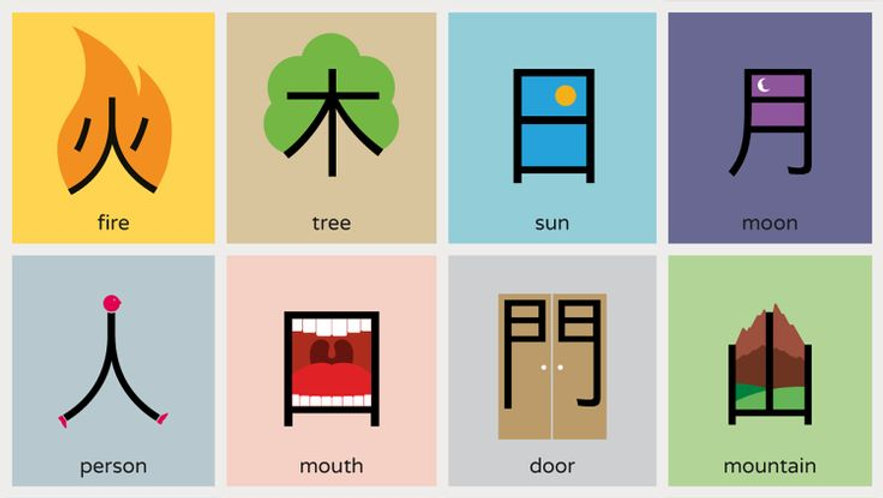
Start with Basic Chinese Characters
Learning basic Chinese characters first is essential because they form the foundation of more complex characters. Focus on high-frequency characters used in daily conversations and writing. Here’s how:
- Learn radicals: Many characters share common components called radicals, which help in memorization.
- Practice stroke order: Writing characters correctly improves recognition and retention.
- Use flashcards: Tools like Anki or physical flashcards reinforce memory through repetition.
Use Mnemonics for Memorization
Mnemonics are memory aids that make learning characters easier by associating them with stories or images. Here’s how to apply them:
See AlsoDebunking 9 Common Myths About Learning Chinese- Create vivid stories: Link the character’s shape or meaning to a memorable narrative.
- Visualize components: Break characters into parts and imagine each part as an object.
- Use apps: Platforms like Memrise incorporate mnemonics into their lessons.
Practice Writing Regularly
Writing by hand reinforces muscle memory and deepens understanding. Follow these steps:
- Use grid paper: Helps maintain proper proportions and stroke order.
- Copy sentences: Practice characters in context to understand usage.
- Review mistakes: Identify and correct errors to avoid reinforcing bad habits.
Leverage Technology and Apps
Digital tools can accelerate learning by providing interactive exercises and instant feedback. Try these methods:
- Use language apps: Duolingo, HelloChinese, and Skritter offer character-focused lessons.
- Enable pinyin input: Typing in Chinese helps recognize characters in digital contexts.
- Watch videos: YouTube channels like ChinesePod explain characters visually.
Immerse Yourself in Chinese Media
Exposure to native content reinforces character recognition and usage. Here’s how to immerse yourself:
- Read children’s books: Simple texts introduce characters in an accessible way.
- Watch subtitled shows: Pair listening with character recognition for better retention.
- Follow social media: Engaging with Chinese posts provides real-world examples.
What apps can I use to learn Chinese language?
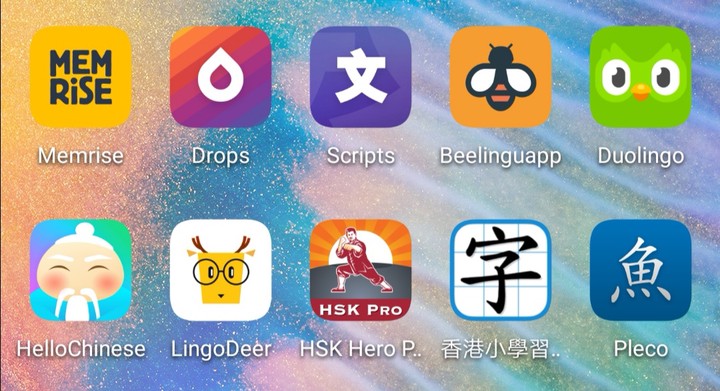
Best Apps for Learning Chinese Vocabulary
If you want to expand your Chinese vocabulary, these apps are highly effective:
- Pleco – A powerful dictionary app with flashcards, stroke order animations, and audio pronunciations.
- Anki – A customizable flashcard app that uses spaced repetition to help memorize words efficiently.
- Memrise – Offers user-generated and official courses with mnemonics to make vocabulary retention easier.
Top Apps for Practicing Chinese Pronunciation
Improving your pronunciation is crucial, and these apps can help:
- HelloChinese – Uses speech recognition to correct your tones and pronunciation in real-time.
- Pimsleur – Focuses on audio-based learning to develop proper speaking habits from the start.
- Speechling – Provides feedback from native speakers to refine your accent and tone accuracy.
Best Apps for Learning Chinese Characters
Mastering Chinese characters requires dedicated practice, and these apps excel:
- Skritter – Specializes in character writing with stroke-order guidance and spaced repetition.
- Hanping Chinese Dictionary – Includes detailed breakdowns of characters, radicals, and example sentences.
- TOFU Learn – A flashcard app designed specifically for learning and reviewing Hanzi.
Interactive Apps for Conversational Chinese
To improve your conversational skills, try these interactive apps:
- HelloTalk – Connects you with native speakers for language exchange via text, voice, or video.
- Tandem – Another language exchange platform with built-in correction tools for real-time learning.
- LingQ – Focuses on immersive learning through real-life conversations and content.
Comprehensive Chinese Learning Apps for Beginners to Advanced
For a structured learning path, these apps cover all levels:
- Duolingo – Gamified lessons that introduce grammar, vocabulary, and listening skills progressively.
- ChineseSkill – Tailors lessons based on your level, with a focus on practical phrases and HSK preparation.
- Rosetta Stone – Uses immersive methods to teach Chinese naturally, without translations.
What is the app that reads Chinese text out loud?

Best Apps for Reading Chinese Text Aloud
Several apps specialize in reading Chinese text aloud with accurate pronunciation and natural voices. Here are the top options:
- Pleco: A popular dictionary app with a built-in text-to-speech feature for Mandarin.
- Google Translate: Supports reading Chinese text aloud in both simplified and traditional characters.
- iTranslate: Offers voice output for Chinese and includes dialect support.
How to Use Text-to-Speech Apps for Chinese
To effectively use these apps, follow these steps:
- Input text: Paste or type Chinese characters into the app.
- Select voice: Choose between male/female or regional accents.
- Adjust speed: Modify playback speed for better comprehension.
Features to Look for in a Chinese TTS App
Key features that enhance the experience include:
- Offline functionality: No internet needed for voice output.
- Multi-dialect support: Covers Mandarin, Cantonese, etc.
- OCR capability: Scans and reads text from images.
Free vs. Paid Chinese Text-to-Speech Apps
Consider these differences when choosing:
- Free apps (e.g., Google Translate) may have limited voice quality.
- Paid apps (e.g., Pleco Premium) offer higher-quality voices.
- Subscription models provide ongoing updates and features.
Accuracy of Chinese Pronunciation in TTS Apps
The best apps ensure precise pronunciation by:
- Using native speakers for voice recordings.
- Supporting tones (Mandarin’s 4 tones).
- Updating regularly to fix errors.
Frequently Asked Questions (FAQ)
What are the best apps for learning to read Chinese characters?
Pleco, Skritter, and HelloChinese are among the top-rated apps for learning to read Chinese characters. Pleco is highly regarded for its comprehensive dictionary and flashcard system, while Skritter excels in teaching character writing through spaced repetition. HelloChinese offers a gamified approach, making it ideal for beginners. These apps combine visual recognition, stroke order, and contextual learning to help users master Chinese characters effectively.
How do these apps help with memorizing Chinese characters?
These apps use spaced repetition systems (SRS) to reinforce memory retention, ensuring characters are reviewed at optimal intervals. Many also incorporate mnemonic techniques and visual associations to make characters easier to remember. For example, Skritter emphasizes writing practice, while Anki allows customizable flashcards. Additionally, apps like DuChinese provide contextual reading with graded texts, helping learners recognize characters in real-world usage.
Can beginners use these apps effectively?
Absolutely! Many apps, such as HelloChinese and ChineseSkill, are designed specifically for beginners, offering step-by-step lessons that start with basic characters and radicals. These apps often include pinyin support and audio pronunciations to aid comprehension. Features like interactive quizzes and progress tracking ensure beginners stay motivated while gradually building their character recognition skills.
Are these apps enough to become fluent in reading Chinese?
While apps are a powerful tool, fluency in reading Chinese requires consistent practice and exposure to diverse materials. Apps can build a strong foundation in character recognition and vocabulary, but supplementing with books, news articles, or conversation practice is essential. Apps like Pleco and DuChinese bridge the gap by offering advanced reading materials, but immersion and real-world application are key to achieving full fluency.
Leave a Reply
Related Posts