
How To Use WeChat - 5 Top Tips To Know

WeChat is one of the most versatile and widely used messaging apps in the world, offering features beyond simple communication. From payments to social networking, it serves as an all-in-one platform for millions of users. However, navigating its many functions can be overwhelming for beginners. Whether you're new to WeChat or looking to enhance your experience, mastering a few key features can make a big difference. In this article, we’ll explore five essential tips to help you use WeChat more effectively. Learn how to optimize chats, make secure payments, manage contacts, and unlock hidden tools to get the most out of this powerful app.
How To Use WeChat - 5 Top Tips To Know
Detailed Explanation:
WeChat is a versatile app that combines messaging, social media, and mobile payments into one platform. Mastering its features can enhance your daily communication and transactions. Below are five essential tips to help you navigate WeChat effectively.
---
See AlsoChengyu, a magic key to Chinese language and culture, or a waste of time?1. Setting Up Your WeChat Account Properly
Detailed Explanation:
To get started, download WeChat from the App Store or Google Play. During setup, ensure you verify your phone number for security. Customize your profile by adding a profile picture, status, and a QR code for easy sharing.
| Step | Action |
|---|---|
| 1 | Download WeChat |
| 2 | Register with a phone number |
| 3 | Complete profile details |
---
2. Mastering WeChat Messaging Features
Detailed Explanation:
WeChat offers text, voice, and video messaging. Use group chats for collaboration and broadcast lists for announcements. Enable message encryption for privacy.
| Feature | Use Case |
|---|---|
| Text Messages | Quick communication |
| Voice Messages | Hands-free chatting |
| Group Chats | Team coordination |
---
3. Using WeChat Pay for Secure Transactions
Detailed Explanation:
Link your bank card to WeChat Pay for seamless transactions. Use it for paying bills, shopping, and peer-to-peer transfers. Enable fingerprint or PIN authentication for security.
| Function | Benefit |
|---|---|
| Mobile Payments | Cashless convenience |
| Money Transfers | Instant sending/receiving |
| Security Layers | Protects financial data |
---
See AlsoLearning to read handwritten Chinese4. Exploring WeChat Mini Programs
Detailed Explanation:
Mini Programs are lightweight apps within WeChat. Use them for food delivery, ride-hailing, or gaming. Access them via the discover tab without downloading extra apps.
| Mini Program | Purpose |
|---|---|
| Meituan | Food delivery |
| Didi | Transportation |
| Games | Entertainment |
---
5. Managing Privacy and Security Settings
Detailed Explanation:
Adjust privacy settings to control who sees your posts and contacts. Enable login alerts and two-factor authentication for account safety.
| Setting | Importance |
|---|---|
| Privacy Controls | Limits profile visibility |
| Login Alerts | Detects unauthorized access |
| 2FA | Extra security layer |
How to use WeChat for the first time?

Downloading and Installing WeChat
To start using WeChat, you need to download and install the app on your device. Follow these steps:
- Go to the App Store (iOS) or Google Play Store (Android).
- Search for WeChat and select the official app.
- Tap Install and wait for the download to complete.
- Open the app once installed.
Creating a WeChat Account
After installing WeChat, you need to create an account. Here’s how:
See AlsoChildren Learning Chinese (Is It Possible)?- Open the app and tap Sign Up.
- Enter your mobile number and select your country.
- Verify your number via the SMS code sent to you.
- Set a password and fill in your profile details.
Adding Contacts on WeChat
WeChat allows you to connect with friends and family. To add contacts:
- Tap the Contacts tab at the bottom.
- Select Add Contacts and choose a method (QR code, phone number, or ID).
- Search for the person and send a friend request.
- Wait for them to accept your request.
Sending Messages and Making Calls
Once you have contacts, you can communicate via messages or calls:
- Open a chat by selecting a contact.
- Type your message and tap Send.
- For calls, tap the Voice Call or Video Call icon.
- Use stickers or voice messages for more interaction.
Exploring WeChat Features
WeChat offers various features beyond messaging. Discover them:
- Use Moments to share updates like a social media feed.
- Access WeChat Pay for mobile payments (requires verification).
- Discover Mini Programs for apps within WeChat.
- Join group chats for community interactions.
How to see if someone read your message on WeChat?
How to Check Read Receipts in WeChat
To determine if someone has read your message on WeChat, you can look for specific indicators depending on the message type:
- Single tick (✓): The message has been sent but not delivered.
- Double ticks (✓✓): The message has been delivered to the recipient's device.
- Double blue ticks (✓✓ in blue): The recipient has opened and read your message.
Enabling Read Receipts in WeChat Settings
To ensure you can see read receipts, follow these steps:
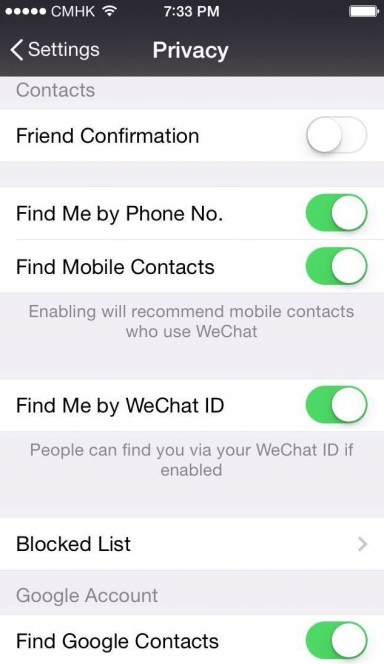
- Open WeChat and go to Me > Settings > Privacy.
- Enable Read Receipts to allow others to see when you've read their messages.
- Note that this setting applies to one-on-one chats only, not group chats.
Why Aren’t Read Receipts Showing?
If you don’t see blue ticks, consider these possibilities:
- The recipient has disabled read receipts in their privacy settings.
- The message was sent in a group chat, where read receipts are not displayed.
- The recipient hasn’t opened the chat yet, even if the message was delivered.
Differences Between Individual and Group Chats
Read receipts behave differently depending on the chat type:
- Individual chats: Blue ticks confirm the message was read.
- Group chats: No read receipts are shown, only delivery ticks.
- Official accounts: Read receipts may not appear at all.
Using WeChat’s “Last Seen” Feature
While WeChat doesn’t have a last seen timestamp, you can infer activity:
- Check if the recipient is online (green dot) in the chat window.
- Observe their WeChat Moments activity for recent updates.
- Note that this method is not definitive for confirming message reads.
Do people use WeChat for dating?

Is WeChat Commonly Used for Dating in China?
While WeChat is primarily a messaging and social media app, it is occasionally used for dating in China. Many users leverage its features like Moments (similar to a social feed) and People Nearby to connect with potential partners. However, it is not specifically designed as a dating platform.
- Moments allows users to share updates, photos, and interests, which can attract potential matches.
- The People Nearby feature helps users discover and chat with others in their vicinity.
- Unlike dedicated dating apps, WeChat lacks matchmaking algorithms or dating-specific tools.
How Do People Use WeChat for Dating?
Users often employ WeChat for dating by initiating conversations through shared groups, QR codes, or the Shake feature. The platform’s versatility makes it a convenient tool for building connections, though it requires more effort than specialized dating apps.
- QR code scanning enables quick profile sharing in social settings.
- The Shake feature randomly connects users who shake their phones simultaneously.
- Group chats focused on hobbies or interests serve as icebreakers for dating.
What Are the Risks of Using WeChat for Dating?
Dating on WeChat comes with risks, including scams, catfishing, and privacy concerns. Since the app isn’t designed for dating, it lacks safety features found in dedicated platforms.
- Fake profiles are common, as verification is less strict than on dating apps.
- Users may encounter romance scams where fraudsters build trust for financial gain.
- Sharing personal details on Moments can lead to privacy breaches.
How Does WeChat Compare to Dedicated Dating Apps?
WeChat differs from apps like Tantan or Tinder by focusing on social networking rather than dating. While it offers communication tools, it lacks features like swiping or compatibility matching.
- No dating algorithms mean users must rely on manual searching.
- Dedicated apps provide safety features like profile verification.
- WeChat’s broader use makes it less efficient for targeted dating.
What Are the Cultural Aspects of Dating on WeChat in China?
In China, WeChat plays a role in modern dating culture, especially among younger generations. Its integration into daily life makes it a natural tool for forming romantic connections, though societal norms influence its use.
- Many Chinese users prefer subtle interactions via Moments before direct messaging.
- Parents and family may use WeChat to introduce potential partners.
- Public displays of affection on Moments are less common due to cultural privacy preferences.
Frequently Asked Questions (FAQ)
How do I create a WeChat account?
Creating a WeChat account is simple and only takes a few minutes. First, download the WeChat app from the App Store or Google Play. Open the app and tap Sign Up, then enter your mobile phone number. You’ll receive a verification code via SMS—enter this code to proceed. Next, set up your profile by adding a profile picture, name, and a secure password. Once completed, your account will be active, and you can start connecting with friends or exploring features like Moments and WeChat Pay.
How can I add friends on WeChat?
Adding friends on WeChat can be done in multiple ways. The easiest method is to use the Add Contacts feature, where you can search by WeChat ID, phone number, or scan a friend’s QR code. You can also sync your phone contacts to find people already on WeChat. Another option is to use the People Nearby or Shake feature to connect with users in your vicinity or random strangers. Always ensure you verify the identity of new contacts before accepting requests for security purposes.
What is WeChat Pay and how do I set it up?
WeChat Pay is a digital wallet feature that allows you to make payments, transfer money, and pay bills directly within the app. To set it up, go to the Me tab and select Wallet. Follow the prompts to link your bank card or add funds. You’ll need to verify your identity by providing personal details, such as your name and ID number. Once activated, you can use WeChat Pay for online purchases, in-store payments, and even splitting bills with friends. Note that this feature may have regional restrictions depending on your location.
WeChat Moments is a social feed where you can share photos, videos, and thoughts with your contacts. To post an update, tap the Discover tab and select Moments. Click the camera icon to upload media or write a text post. You can customize privacy settings to limit visibility to specific friends or hide certain posts. Friends can like or comment on your updates, creating a more interactive experience. Remember that deleted posts cannot be recovered, so double-check before sharing.
Leave a Reply
Related Posts