
Chinese input methods: A guide for second language learners

Learning Chinese as a second language presents unique challenges, particularly when it comes to typing. Unlike alphabetic languages, Chinese relies on characters, making input methods essential for digital communication. This guide explores the most effective Chinese input methods for second language learners, from pinyin-based systems to handwriting recognition and voice input. Whether you're a beginner or an advanced learner, understanding these tools can significantly enhance your efficiency and confidence. We’ll break down the pros and cons of each method, offering practical tips to help you choose the right approach for your needs. Mastering these techniques will streamline your learning journey and improve your overall fluency.
Chinese Input Methods: A Guide for Second Language Learners
Learning to type in Chinese can be challenging for second language learners due to the complexity of Chinese characters. Unlike alphabetic languages, Chinese requires different input methods to convert phonetic or visual inputs into characters. This guide explores the most common Chinese input methods, their advantages, and how learners can master them efficiently.
1. Pinyin Input Method
The Pinyin input method is the most widely used system for typing Chinese characters. It relies on Romanization, where users type the Pinyin (phonetic spelling) of a word, and the software suggests matching characters. This method is beginner-friendly since learners already study Pinyin as part of their language foundation.
See AlsoIntroducing Chinese quiz tournaments on WordSwingPros:
- Easy to learn for beginners.
- Works well with standard QWERTY keyboards.
- Provides predictive text to speed up typing.
Cons:
- Requires accurate Pinyin knowledge (tones can affect character selection).
- Homophones (same Pinyin, different characters) may slow down typing.
| Feature | Description |
|---|---|
| Input Style | Phonetic (Pinyin-based) |
| Best For | Beginners and intermediate learners |
| Keyboard Requirement | Standard QWERTY |
2. Wubi Input Method
The Wubi method is a shape-based input system that breaks characters into radicals and strokes. Instead of Pinyin, users input character components, making it faster for those familiar with character structure.
See AlsoHow to find more time to practise Chinese listeningPros:
- Faster for advanced typists.
- Reduces reliance on pronunciation.
Cons:
- Steeper learning curve.
- Requires memorization of Wubi codes.
| Feature | Description |
|---|---|
| Input Style | Shape-based (radicals) |
| Best For | Advanced learners and native typists |
| Keyboard Requirement | QWERTY (special layout optional) |
3. Handwriting Input Method
The handwriting input method allows users to draw characters on a touchscreen or graphics tablet. This method is useful for learners still mastering Pinyin or character recognition.
See AlsoHow to Approach Chinese GrammarPros:
- Helps reinforce character memorization.
- Useful for rare or complex characters.
Cons:
- Slower than keyboard methods.
- Requires a touchscreen device.
| Feature | Description |
|---|---|
| Input Style | Hand-drawn characters |
| Best For | Visual learners and beginners |
| Device Requirement | Touchscreen or stylus |
4. Voice Input Method
The voice input method converts spoken Chinese into text using speech recognition. It’s helpful for learners practicing pronunciation.
Pros:
- Improves speaking skills.
- Fast and hands-free.
Cons:
- Requires clear pronunciation.
- May struggle with accents.
| Feature | Description |
|---|---|
| Input Style | Speech-to-text |
| Best For | Conversational learners |
| Device Requirement | Microphone-enabled device |
5. Cangjie Input Method
The Cangjie method is another shape-based system that uses keyboard shortcuts based on character decomposition. It’s popular in Taiwan and Hong Kong.
Pros:
- High typing speed for experts.
- No reliance on pronunciation.
Cons:
- Complex rules.
- Less intuitive for beginners.
| Feature | Description |
|---|---|
| Input Style | Radical-based decomposition |
| Best For | Advanced users in traditional Chinese regions |
| Keyboard Requirement | QWERTY (special layout optional) |
How to add Chinese input method in Windows 10?
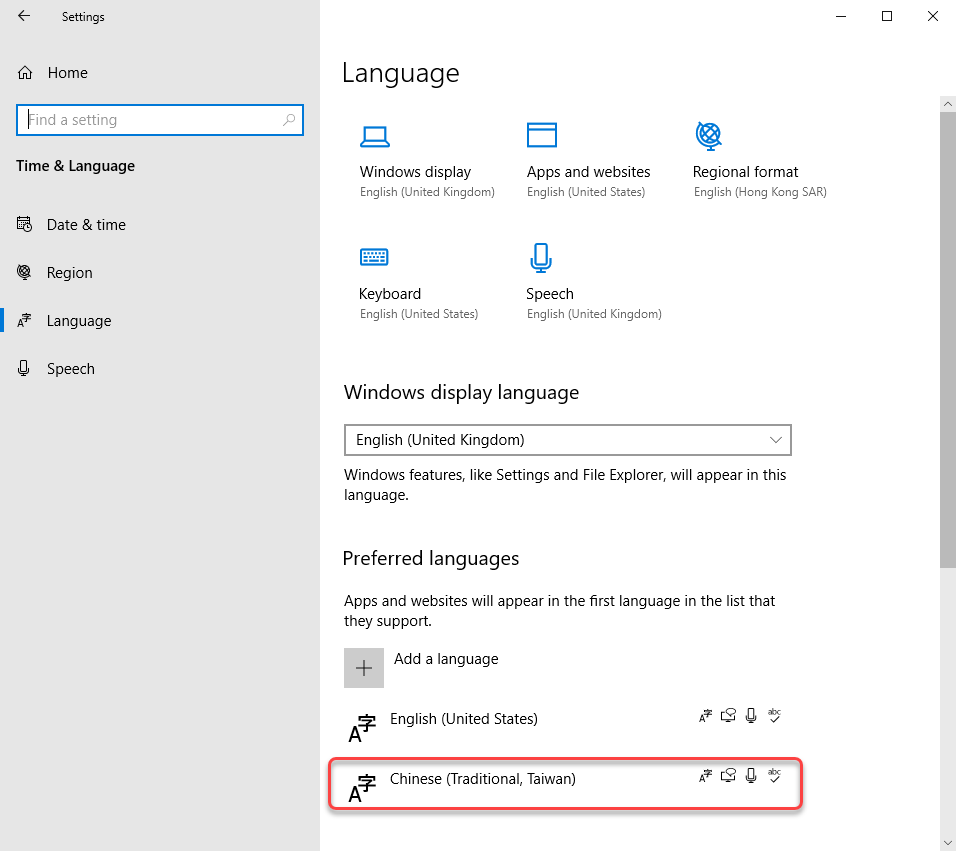
How to Install Chinese Language Pack in Windows 10
To use a Chinese input method in Windows 10, you first need to install the Chinese language pack. Follow these steps:
- Open Settings by pressing Win + I.
- Go to Time & Language > Language.
- Click Add a preferred language and search for Chinese (Simplified) or Chinese (Traditional).
- Select the language and click Next, then check Install language pack.
- Click Install and wait for the process to complete.
How to Add Chinese Input Method in Windows 10
After installing the language pack, you need to add a Chinese input method:
- Go back to Settings > Time & Language > Language.
- Select the installed Chinese language and click Options.
- Under Keyboards, click Add a keyboard.
- Choose a Chinese input method like Microsoft Pinyin or Microsoft Wubi.
- The input method will now be available in your keyboard list.
How to Switch Between English and Chinese Input
Switching between English and Chinese input is simple:
- Press Win + Spacebar to toggle between installed keyboards.
- Alternatively, click the language abbreviation (e.g., ENG or CHS) in the taskbar.
- Select the desired input method from the list.
How to Customize Chinese Input Settings
You can customize the Chinese input method for better usability:
- Open Settings > Time & Language > Language.
- Select Chinese and click Options.
- Under Keyboards, click the input method (e.g., Microsoft Pinyin).
- Adjust settings like input mode, autocorrect, or keyboard layout.
How to Use Chinese Input Method Efficiently
To improve efficiency with the Chinese input method, follow these tips:
- Use shortcut keys like Shift to switch between Chinese and English input.
- Enable cloud suggestions in the input method settings for better word predictions.
- Practice using Pinyin abbreviations or Wubi codes for faster typing.
What is the difference between pinyin and wubi?
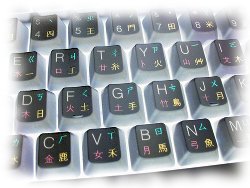
Input Method: Pinyin vs. Wubi
Pinyin is a phonetic input method that uses the Roman alphabet to represent Chinese characters based on their pronunciation. Users type the pinyin spelling (e.g., nihao for 你好), and the system suggests matching characters. In contrast, Wubi (Wubizixing) is a shape-based input method where characters are broken down into strokes and components assigned to specific keys. Users memorize keystroke combinations corresponding to character structures rather than sounds.
- Pinyin relies on pronunciation, making it accessible for beginners.
- Wubi requires memorization of character compositions but offers faster typing for experts.
- Pinyin is more widely used due to its simplicity.
Learning Curve: Ease of Adoption
Pinyin is easier to learn, especially for non-native speakers familiar with the Roman alphabet. It aligns with Mandarin pronunciation rules. Wubi, however, demands memorization of complex character decompositions and key mappings, making it challenging for beginners but efficient for professionals.
- Pinyin requires basic knowledge of Mandarin sounds.
- Wubi necessitates studying character stroke patterns.
- Pinyin has a gentler learning curve compared to Wubi.
Typing Speed and Efficiency
While Pinyin users may encounter homophone disambiguation (multiple characters sharing the same pinyin), Wubi allows precise character input without phonetic ambiguity. Skilled Wubi typists achieve higher speeds due to fewer keystrokes per character.
- Wubi reduces keystrokes by avoiding phonetic duplicates.
- Pinyin speeds depend on predictive text algorithms.
- Wubi is favored in data-entry and professional settings.
Character Coverage and Limitations
Pinyin supports all characters with standardized pronunciations, but rare or dialectal terms may lack pinyin representations. Wubi covers virtually all Chinese characters, including those without clear pronunciations, by focusing on structure.
- Pinyin struggles with unpronounceable or archaic characters.
- Wubi handles complex characters uniformly.
- Pinyin is limited by phonetic inconsistencies.
Popularity and User Base
Pinyin dominates everyday use, from smartphones to computers, due to its simplicity. Wubi retains a niche following among typists, stenographers, and older generations trained in shape-based methods.
- Pinyin is the default input for most learners.
- Wubi persists in specialized fields.
- Pinyin's adoption is reinforced by educational systems.
What is the Chinese Zhuyin input method?
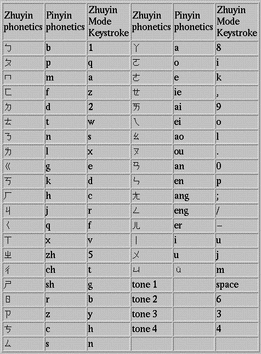
What is the Chinese Zhuyin Input Method?
The Chinese Zhuyin input method, also known as Bopomofo, is a phonetic typing system used primarily in Taiwan to input Traditional Chinese characters on electronic devices. It is based on the Zhuyin Fuhao (注音符號) system, which consists of 37 phonetic symbols representing Mandarin sounds. Users type by selecting these symbols, and the system suggests corresponding characters.
- Phonetic-based: Relies on pronunciation rather than character structure.
- Traditional Chinese: Mainly used in Taiwan for Traditional characters.
- Symbols: Includes 21 consonants, 16 vowels, and 4 tone marks.
How Does the Zhuyin Input Method Work?
The Zhuyin input method requires users to type the phonetic symbols in the correct order, matching the syllables of the word. The system then displays a list of possible characters for selection.
- Step-by-step input: Type symbols sequentially (e.g., ㄅㄆㄇ for bpm).
- Character prediction: Software suggests matching characters as you type.
- Tone marks: Optional tone input to refine results.
Advantages of Using Zhuyin Input
The Zhuyin method offers several benefits, especially for learners and native speakers in Taiwan.
- Accuracy: Reduces homophone errors compared to Pinyin.
- Learning tool: Helps beginners grasp Mandarin pronunciation.
- Local preference: Widely adopted in Taiwanese education and tech.
Zhuyin vs. Pinyin: Key Differences
While both are phonetic input methods, Zhuyin and Pinyin differ in symbols, usage regions, and learning curves.
- Symbols: Zhuyin uses unique glyphs; Pinyin uses Latin letters.
- Region: Zhuyin is Taiwan-centric; Pinyin is global.
- Complexity: Zhuyin may be harder for non-natives initially.
Where is the Zhuyin Input Method Used?
The Zhuyin input method is predominantly used in Taiwan, where it is the standard phonetic system for education and digital communication.
- Education: Taught in Taiwanese schools for Mandarin.
- Tech devices: Pre-installed on Taiwanese smartphones and computers.
- Localization: Rarely seen outside Taiwan.
Frequently Asked Questions (FAQ)
What are the most common Chinese input methods for beginners?
For second language learners, the most accessible Chinese input methods are Pinyin and handwriting recognition. Pinyin uses the Roman alphabet to phonetically spell Chinese characters, making it ideal for beginners familiar with Western keyboards. Handwriting input, on the other hand, allows users to draw characters directly on a touchscreen, which can help reinforce character recognition and stroke order. Some learners also explore voice input, but accuracy may vary depending on pronunciation skills. Choosing the right method depends on individual learning goals and comfort with technology.
How does Pinyin input work for typing Chinese characters?
The Pinyin input method converts Romanized Chinese (Pinyin) into corresponding Chinese characters. Users type the phonetic spelling of a word (e.g., nihao for 你好), and the input system suggests a list of matching characters. Learners must then select the correct one from the options. This method requires knowledge of Mandarin pronunciation and basic Pinyin rules. Many input tools also support predictive text and shortcuts for faster typing. While convenient, relying solely on Pinyin may slow down character memorization, so combining it with handwriting practice is recommended.
What are the advantages of using handwriting input for learning Chinese?
Handwriting input is highly beneficial for reinforcing character recognition and stroke order. By physically drawing characters, learners engage muscle memory, which aids retention. This method also helps distinguish between similar-looking characters, as the system often requires precise strokes. Additionally, it encourages learners to practice correct radical composition, a key aspect of Chinese writing. However, handwriting input can be slower than Pinyin, especially for complex characters. It’s best used as a supplementary tool alongside other input methods to build a well-rounded skill set.
Are there input methods specifically designed for advanced learners?
Advanced learners often transition to Wubi or Cangjie input methods, which rely on character components rather than pronunciation. Wubi breaks characters into five basic stroke types, assigning each a key on the keyboard, while Cangjie uses radicals and complex codes. These methods allow for faster typing once mastered but require deep familiarity with character structure. Another option is voice input, which demands near-native pronunciation. Advanced learners may also experiment with shortcut-based inputs or customized dictionaries to streamline their workflow. Mastery of these methods can significantly improve typing efficiency for long-term Chinese use.
Leave a Reply
Related Posts