
How To Turn On Speaking Exercises In Duolingo: easy steps

Duolingo has become a popular tool for language learners worldwide, offering a variety of exercises to enhance reading, writing, listening, and speaking skills. Among these, speaking exercises are particularly valuable for improving pronunciation and building confidence in real-life conversations. However, some users may find it challenging to locate or activate these features within the app. This article provides a straightforward guide on how to turn on speaking exercises in Duolingo, ensuring you can fully utilize this powerful tool. Whether you're a beginner or an advanced learner, these easy steps will help you unlock speaking practice and take your language skills to the next level.
How To Turn On Speaking Exercises In Duolingo: Easy Steps
1. Open the Duolingo App or Website
To begin, you need to access Duolingo. You can do this by opening the Duolingo app on your smartphone or tablet, or by visiting the Duolingo website on your computer. Make sure you are logged into your account to access all features.
Once you are logged in, click on your profile icon located at the bottom right corner of the app or the top right corner of the website. From there, select Settings to access the various options available for customizing your learning experience.
See AlsoThe Chinese-Chinese dictionary survival guide3. Enable Speaking Exercises
In the Settings menu, look for the section labeled Speaking Exercises. Toggle the switch to enable this feature. This will allow Duolingo to include speaking exercises in your lessons, helping you practice pronunciation and improve your speaking skills.
4. Adjust Microphone Permissions
For speaking exercises to work properly, Duolingo needs access to your device's microphone. If you are using the app, ensure that microphone permissions are enabled in your device settings. On the website, you may need to allow microphone access when prompted by your browser.
5. Start Practicing Speaking Exercises
Once everything is set up, you can start practicing speaking exercises. These exercises will appear during your lessons, and you will be prompted to repeat phrases or answer questions using your voice. Make sure to speak clearly and follow the instructions provided.
See AlsoHow to learn Zhuyin (Bopomofo) in two hours| Step | Action |
|---|---|
| 1 | Open Duolingo app or website |
| 2 | Navigate to profile settings |
| 3 | Enable speaking exercises |
| 4 | Adjust microphone permissions |
| 5 | Start practicing speaking exercises |
How to activate speaking exercises in Duolingo?

How to Enable Speaking Exercises in Duolingo
To activate speaking exercises in Duolingo, follow these steps:
- Open the Duolingo app on your device.
- Go to your profile settings by tapping on your profile icon.
- Select Privacy Settings and ensure that microphone access is enabled.
- Navigate to the course you are studying and check if speaking exercises are available for your language.
- If prompted, grant Duolingo permission to access your microphone.
Why Speaking Exercises May Not Be Available
If you cannot find speaking exercises, consider the following reasons:
See AlsoHow to use mnemonics to learn Mandarin tones and pronunciation- Your device may not have a microphone or it may be disabled.
- The language course you are studying may not yet include speaking exercises.
- Your app version might be outdated; update Duolingo to the latest version.
How to Check Microphone Permissions for Duolingo
To ensure Duolingo has access to your microphone:
- Go to your device’s settings.
- Find the app permissions section.
- Locate Duolingo and enable microphone access.
How to Practice Speaking Without Exercises
If speaking exercises are unavailable, you can still practice speaking:
- Repeat phrases aloud during listening exercises.
- Use the Duolingo Stories feature to practice pronunciation.
- Record yourself speaking and compare it to the app’s audio.
How to Troubleshoot Speaking Exercise Issues
If speaking exercises are not working, try these troubleshooting steps:
- Restart the Duolingo app or your device.
- Check your internet connection, as speaking exercises require a stable connection.
- Reinstall the app if the issue persists.
Why is Duolingo not doing speaking exercises?

Why Does Duolingo Lack Speaking Exercises?
Duolingo primarily focuses on gamification and accessibility, which makes it a popular language-learning app. However, the absence of dedicated speaking exercises can be attributed to several factors:
- Technical limitations: Implementing accurate speech recognition requires advanced technology, which can be costly and complex to integrate.
- User experience: Many users prefer a casual learning approach, and adding speaking exercises might make the app feel more demanding.
- Resource allocation: Duolingo prioritizes features that cater to a broader audience, such as vocabulary and grammar exercises.
Is Duolingo's Speech Recognition Technology Insufficient?
Duolingo does include some speaking exercises, but they are limited in scope. The challenges with speech recognition technology include:
- Accuracy: Ensuring the system correctly interprets diverse accents and pronunciations is difficult.
- Development costs: Building and maintaining a robust speech recognition system requires significant investment.
- User frustration: Inaccurate feedback from the system could discourage learners.
How Does Duolingo's Approach Differ from Other Language Apps?
Unlike apps like Rosetta Stone or Babbel, Duolingo emphasizes gamified learning over structured speaking practice. Key differences include:
- Focus on fun: Duolingo uses rewards and streaks to keep users engaged, rather than intensive speaking drills.
- Accessibility: The app is designed to be used anywhere, anytime, without requiring a microphone or quiet environment.
- Target audience: Duolingo caters to casual learners rather than those seeking fluency.
What Are the Challenges of Adding Speaking Exercises to Duolingo?
Incorporating speaking exercises into Duolingo presents several challenges:
- Technical complexity: Developing a reliable speech recognition system is resource-intensive.
- User engagement: Speaking exercises might feel intimidating or inconvenient for some users.
- Content adaptation: Existing lessons would need to be redesigned to include speaking components.
Are There Alternatives to Speaking Exercises on Duolingo?
While Duolingo lacks dedicated speaking exercises, it offers alternatives to practice speaking skills:
- Voice-enabled exercises: Some lessons include optional speaking tasks.
- Duolingo Events: Users can join live conversations with other learners.
- Third-party tools: Learners can supplement Duolingo with apps like HelloTalk or iTalki for speaking practice.
How do I turn my speech back on Duolingo?
How to Enable Speech Recognition on Duolingo
To turn your speech back on in Duolingo, follow these steps:
- Open the Duolingo app on your device.
- Go to your profile by tapping on the profile icon in the bottom right corner.
- Select Settings from the menu.
- Scroll down to the Speech Recognition section.
- Toggle the switch to enable speech exercises.
Why Is My Speech Recognition Not Working on Duolingo?
If your speech recognition is not working, consider the following:
- Ensure your device's microphone is enabled and functioning properly.
- Check if the app has permission to access your microphone in your device settings.
- Update the Duolingo app to the latest version to avoid bugs.
- Restart your device to resolve any temporary glitches.
- If the issue persists, contact Duolingo support for further assistance.
How to Check Microphone Permissions for Duolingo
To verify microphone permissions for Duolingo:
- Go to your device's Settings.
- Navigate to Apps or App Permissions.
- Find and select Duolingo from the list.
- Ensure that Microphone permissions are enabled.
- If permissions are off, toggle the switch to grant access.
How to Troubleshoot Speech Recognition Issues on Duolingo
If you're experiencing issues with speech recognition, try these troubleshooting steps:
- Check your internet connection as speech recognition requires a stable connection.
- Clear the cache of the Duolingo app to remove any corrupted data.
- Reinstall the Duolingo app to ensure a fresh installation.
- Test your microphone with another app to confirm it's working.
- Ensure your device's operating system is up to date.
How to Practice Speaking Exercises on Duolingo
To practice speaking exercises effectively:
- Enable speech recognition in the app settings as described above.
- Choose lessons that include speaking exercises.
- Speak clearly and at a moderate pace for better recognition.
- Use headphones with a built-in microphone for improved accuracy.
- Review feedback from the app to improve your pronunciation.
How to start Duolingo speaking?
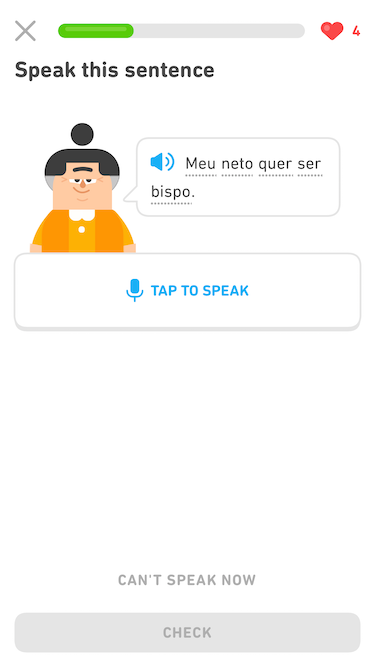
How to Access the Speaking Exercises on Duolingo
To start using the speaking exercises on Duolingo, follow these steps:
- Open the Duolingo app or website and log in to your account.
- Select the language course you are learning.
- Navigate to a lesson that includes speaking exercises (these are usually marked with a microphone icon).
- Ensure your device's microphone is enabled and functioning properly.
- Follow the prompts to speak the phrases or words displayed on the screen.
Setting Up Your Microphone for Duolingo Speaking
Before starting, it’s essential to set up your microphone correctly:
- Check your device’s settings to ensure the microphone is enabled.
- Grant Duolingo permission to access your microphone when prompted.
- Test your microphone by speaking into it and checking if the app registers your voice.
- If issues persist, troubleshoot by restarting the app or device.
Tips for Improving Pronunciation on Duolingo
To make the most of Duolingo’s speaking exercises, focus on improving your pronunciation:
- Listen carefully to the native speaker’s pronunciation before attempting to speak.
- Repeat the phrases multiple times to practice and refine your accent.
- Use the app’s feedback to identify and correct mistakes.
- Record yourself speaking and compare it to the native pronunciation.
Practicing Speaking Regularly on Duolingo
Consistency is key to mastering speaking skills:
- Set a daily goal to complete at least one speaking exercise.
- Incorporate speaking practice into your regular Duolingo routine.
- Challenge yourself with more advanced lessons as you progress.
- Use the app’s reminders to stay consistent with your practice.
Using Duolingo Speaking for Real-Life Conversations
Duolingo’s speaking exercises can help prepare you for real-life interactions:
- Practice common phrases and sentences used in everyday conversations.
- Focus on mastering greetings, questions, and responses.
- Use the app’s stories feature to practice speaking in context.
- Supplement Duolingo with real-life practice by speaking with native speakers.
Frequently Asked Questions From our Community
How do I enable speaking exercises in Duolingo?
To enable speaking exercises in Duolingo, first, ensure that your device has a working microphone. Open the Duolingo app and go to your profile settings. Look for the speaking exercises option under the Privacy or Account section. Toggle the switch to turn it on. If prompted, grant Duolingo permission to access your microphone. Once enabled, you’ll start encountering speaking exercises during your lessons.
Why can’t I find the speaking exercises option in Duolingo?
If you can’t find the speaking exercises option, it could be due to several reasons. First, check if your device’s microphone is functioning properly. Second, ensure that your app is updated to the latest version. Some older versions may not support this feature. Additionally, speaking exercises might not be available for all languages or courses. If the issue persists, try reinstalling the app or contacting Duolingo support for assistance.
No, you do not need a premium subscription to access speaking exercises in Duolingo. This feature is available to all users, whether they are on the free or paid plan. However, some advanced features or additional practice sessions might be limited to premium subscribers. For basic speaking exercises, the free version of Duolingo is sufficient.
Can I practice speaking exercises on the Duolingo website?
Currently, speaking exercises are primarily available on the Duolingo mobile app. The website version may not fully support this feature due to limitations in microphone access and integration. To make the most of speaking exercises, it’s recommended to use the Duolingo app on your smartphone or tablet, where the feature is fully optimized and supported.
Leave a Reply
Related Posts