
Duolingo Turn Off Leagues: Easy Steps to Follow

Duolingo, a popular language-learning platform, offers a gamified experience to keep users motivated, including competitive leagues. However, some learners may find the league system distracting or stressful, preferring to focus solely on their language goals without the added pressure of competition. Fortunately, Duolingo provides an option to turn off leagues, allowing users to customize their learning experience. This article outlines easy steps to disable leagues, ensuring a more personalized and distraction-free journey. Whether you're a casual learner or someone seeking a quieter approach to language acquisition, these steps will help you tailor Duolingo to better suit your needs and preferences.
How to Turn Off Leagues in Duolingo: A Step-by-Step Guide
What Are Duolingo Leagues?
Duolingo Leagues are a competitive feature that ranks users based on their weekly XP (experience points). The goal is to motivate learners by allowing them to compete with others in their league. However, some users may find this feature distracting or stressful, especially if they prefer a more relaxed learning environment. Turning off leagues can help you focus solely on your language learning journey without the added pressure of competition.
Why Would You Want to Turn Off Leagues?
While Duolingo Leagues can be motivating for some, they might not suit everyone. Here are a few reasons why users might want to disable this feature:
- Distraction: The competitive aspect can take away from the primary goal of learning a language.
- Stress: Some users feel pressured to earn XP rather than focusing on understanding the material.
- Privacy Concerns: Leagues display your progress publicly, which might not appeal to everyone.
Step 1: Access Your Duolingo Settings
To turn off leagues, you first need to access your Duolingo settings. Follow these steps:
1. Open the Duolingo app or website.
2. Click on your profile icon in the top-right corner.
3. Select Settings from the dropdown menu.
Once in the settings menu, you’ll need to find the privacy options:
1. Scroll down to the Privacy section.
2. Look for the option labeled Make My Profile Private.
3. Enable this option to disable leagues and other public features.
Step 3: Confirm the Changes
After enabling the private profile setting, confirm the changes:
1. Save your settings by clicking Save Changes.
2. Restart the app or refresh the page to ensure the changes take effect.
3. Verify that leagues are no longer visible on your dashboard.
| Step | Action |
|---|---|
| 1 | Access Duolingo Settings |
| 2 | Navigate to Privacy Settings |
| 3 | Enable Private Profile |
| 4 | Save and Confirm Changes |
What Happens After Turning Off Leagues?
Once you’ve turned off leagues, your profile will no longer be visible in the public rankings. This means:
- You won’t see your league progress or rankings.
- Your XP will still be tracked, but it won’t contribute to any competitive leaderboard.
- You can focus entirely on learning without the pressure of maintaining a high rank.
Can You Re-Enable Leagues Later?
Yes, you can re-enable leagues at any time if you change your mind. Simply follow the same steps and disable the private profile setting. Your profile will then become public again, and you’ll be able to participate in leagues. Keep in mind that your previous league progress will not be restored, and you’ll start fresh in the lowest league.
Is there a way to turn off leagues in Duolingo?

How to Disable Leagues in Duolingo
Currently, Duolingo does not provide a direct option to disable leagues entirely. However, there are a few workarounds to avoid participating in them:
- Switch to a Private Profile: By making your profile private, you can opt out of leagues and other competitive features.
- Avoid Earning XP: Leagues are based on XP earned. If you stop earning XP, you won't be placed in a league.
- Use Duolingo Schools: If you have access to Duolingo Schools, you can use it to avoid leagues, as this version does not include competitive features.
Why Would Someone Want to Turn Off Leagues?
Some users prefer to turn off leagues for various reasons, including:
- Reduced Pressure: Leagues can create unnecessary stress for users who prefer a relaxed learning environment.
- Focus on Learning: Without the distraction of competition, users can concentrate solely on language acquisition.
- Privacy Concerns: Some users may not want their progress or activity to be visible to others.
What Are Duolingo Leagues?
Duolingo Leagues are a competitive feature that groups users into tiers based on their weekly XP earnings. The goal is to encourage consistent practice by fostering competition. Here’s how they work:
See AlsoZooming in: The tools you need to break down and understand Chinese- Weekly Reset: Leagues reset every week, and users are placed in new groups based on their activity.
- Promotion and Demotion: Users can move up or down leagues depending on their performance.
- Rewards: Top performers in higher leagues can earn special badges and recognition.
Limitations of Duolingo Leagues
While leagues can be motivating for some, they come with certain limitations:
- No Customization: Users cannot customize or opt out of leagues without using workarounds.
- Focus on Quantity Over Quality: Leagues prioritize XP, which may lead users to focus on earning points rather than deep learning.
- Limited Accessibility: Not all users enjoy or benefit from competitive features.
Alternatives to Duolingo Leagues
If leagues are not your preference, consider these alternatives to stay motivated:
- Set Personal Goals: Create your own learning milestones and track your progress independently.
- Use Duolingo Stories: Focus on interactive stories to practice reading and listening without competition.
- Join Language Communities: Engage with language learners in forums or social media groups for support and motivation.
Is there a way to turn off leaderboards in Duolingo?
How to Disable Leaderboards in Duolingo
Yes, there is a way to turn off leaderboards in Duolingo. To do this, you need to switch to a private profile. Here’s how:
- Open the Duolingo app or website and log in to your account.
- Go to your profile settings by clicking on your profile picture.
- Find the option to make your profile private and enable it.
- Once your profile is private, you will no longer appear on leaderboards.
Why Would You Want to Turn Off Leaderboards?
Some users prefer to disable leaderboards for various reasons:
- To focus on personal progress without the pressure of competition.
- To avoid distractions from the gamified elements of the app.
- To maintain privacy and not share progress with others.
Does Turning Off Leaderboards Affect Learning?
Disabling leaderboards does not impact your ability to learn on Duolingo. Here’s why:
- You still have access to all lessons and exercises.
- Your streaks and achievements remain intact.
- You can continue tracking your progress through the progress tracker.
Can You Re-Enable Leaderboards Later?
Yes, you can re-enable leaderboards at any time by following these steps:
- Go to your profile settings.
- Switch your profile back to public.
- You will automatically rejoin the leaderboards and see your ranking.
Are There Alternatives to Turning Off Leaderboards?
If you don’t want to disable leaderboards completely, consider these alternatives:
- Use the practice mode to focus on learning without earning points.
- Set personal goals to stay motivated independently of leaderboards.
- Ignore the leaderboard tab and focus on the learning interface.
Can you skip leagues in Duolingo?

What Are Duolingo Leagues?
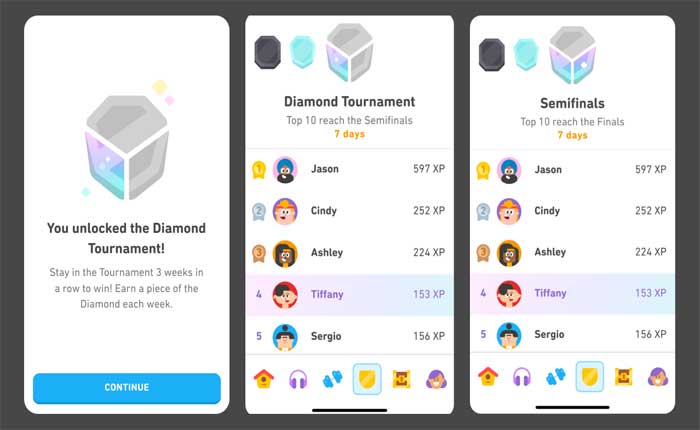
Duolingo Leagues are a competitive feature that groups users into tiers based on their weekly XP (experience points) earnings. The leagues range from Bronze to Diamond, with Diamond being the highest. Users are placed in a league with 30 other learners, and their goal is to earn enough XP to advance to the next league or avoid relegation to a lower one.
- Bronze League: The starting point for all users.
- Silver League: Achieved by ranking in the top 15 of the Bronze League.
- Gold League: Requires consistent effort to rank in the top 15 of the Silver League.
Can You Skip Leagues in Duolingo?
No, you cannot skip leagues in Duolingo. The system is designed to progress users through each league sequentially. To move up, you must earn enough XP to rank in the top 15 of your current league. Skipping leagues is not an option, as the platform encourages steady progression and consistent learning.
- Sequential Progression: You must advance through each league one at a time.
- XP Requirements: Earning more XP helps you rank higher and move up faster.
- No Shortcuts: There is no feature or setting to bypass leagues.
How to Advance Faster in Duolingo Leagues
While you cannot skip leagues, you can advance faster by earning more XP. Focus on completing lessons, practicing regularly, and utilizing XP-boosting activities like Double XP boosts or completing Challenges.
- Daily Practice: Consistent daily practice helps accumulate XP quickly.
- Double XP: Activate Double XP by practicing early in the morning or after completing a streak.
- Challenges: Complete timed challenges for bonus XP.
What Happens If You Don’t Earn Enough XP?
If you don’t earn enough XP to rank in the top 15 of your current league, you may be relegated to a lower league. For example, if you are in the Gold League and finish in the bottom 5, you will drop back to the Silver League.
- Relegation: Falling to a lower league if you don’t earn enough XP.
- Motivation: The threat of relegation encourages consistent effort.
- Re-entry: You can re-enter the higher league by earning enough XP in the next week.
Is There a Way to Reset or Change Leagues?
There is no official way to reset or change leagues manually. However, if you stop using Duolingo for an extended period, your account may be placed in a lower league when you return. This is not a guaranteed method, as the system prioritizes active users.
- Inactivity: Long periods of inactivity may result in being placed in a lower league.
- No Manual Reset: Users cannot manually reset their league status.
- Active Participation: Staying active is key to maintaining or advancing your league position.
What is the point of the leagues in Duolingo?
What Are Duolingo Leagues?
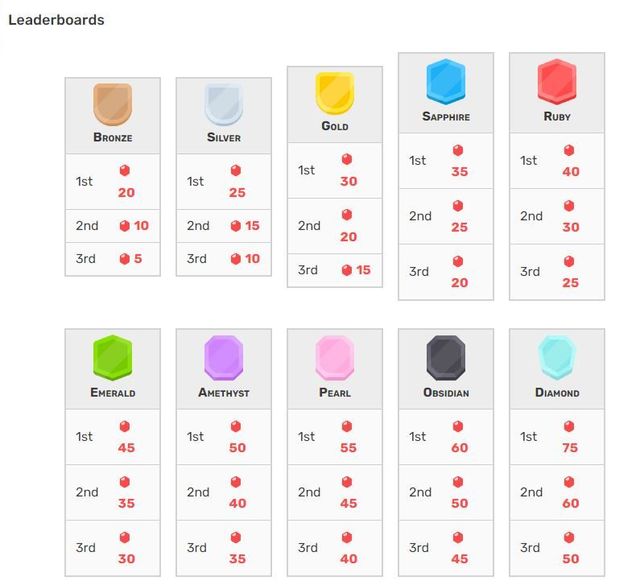
Duolingo Leagues are a gamified ranking system designed to motivate users to practice more frequently and consistently. Users are grouped into leagues based on their weekly XP (experience points) earnings, and they compete to move up to higher leagues or avoid relegation to lower ones. This system encourages healthy competition and fosters a sense of achievement as users progress through the ranks.
How Do Duolingo Leagues Work?
Duolingo Leagues operate on a weekly basis, resetting every Monday. Here’s how they function:
- Users earn XP by completing lessons, practicing skills, or participating in challenges.
- At the end of the week, the top performers in each league advance to a higher league, while the lowest performers are relegated to a lower one.
- Leagues range from Bronze (the lowest) to Diamond (the highest), with each level offering greater prestige and challenges.
Why Are Duolingo Leagues Important?
Duolingo Leagues serve multiple purposes:
- They provide motivation by creating a sense of competition and accomplishment.
- They encourage consistent learning, as users strive to earn XP daily to maintain or improve their league position.
- They foster a community feeling, as users can see how they rank compared to others.
What Are the Benefits of Participating in Leagues?
Participating in Duolingo Leagues offers several advantages:
- Increased engagement: The competitive aspect keeps users coming back to the app regularly.
- Skill improvement: Regular practice leads to better retention and mastery of the language.
- Recognition: Advancing to higher leagues provides a sense of achievement and progress.
How Can You Succeed in Duolingo Leagues?
To excel in Duolingo Leagues, consider the following strategies:
- Set daily goals: Aim to earn a specific amount of XP each day to stay competitive.
- Focus on high-XP activities: Complete lessons, challenges, and bonus skills to maximize your points.
- Stay consistent: Regular practice is key to maintaining your league position and advancing further.
Frequently Asked Questions From our Community
How can I turn off leagues in Duolingo?
To turn off leagues in Duolingo, you need to switch your account to private mode. First, log in to your Duolingo account on a web browser. Go to your profile settings, scroll down to the Privacy section, and toggle the option to make your profile private. This will disable leagues and remove you from the competitive leaderboard system.
Why would I want to disable Duolingo leagues?
Some users prefer to disable leagues to focus on learning without the pressure of competition. Leagues can sometimes create stress or distractions, especially for those who want to learn at their own pace. Turning off leagues allows you to enjoy a more personalized and relaxed learning experience without worrying about rankings or points.
Can I still track my progress if I turn off leagues?
Yes, you can still track your progress even after turning off leagues. Duolingo provides various tools, such as streaks, XP goals, and skill levels, to monitor your learning journey. Disabling leagues only removes the competitive aspect, but all other features, including progress tracking, remain fully functional.
Is it possible to re-enable leagues after turning them off?
Absolutely! If you decide to re-enable leagues, simply go back to your profile settings on the Duolingo website and toggle off the private mode. This will restore your access to leagues and place you back into the competitive leaderboard system. You can switch between private and public modes as often as you like.
Leave a Reply
Related Posts