
Duolingo With Friends: Team Up with Friends & Family

Learning a new language can be a challenging yet rewarding journey, and doing it with others makes the experience even more enjoyable. Duolingo, the popular language-learning app, has introduced a new feature called Duolingo With Friends, designed to bring people together through shared goals and friendly competition. This innovative tool allows users to team up with friends and family, turning language practice into a collaborative and motivating activity. Whether you're aiming to learn Spanish, French, or any other language, this feature encourages accountability, fosters connections, and makes progress more fun. Discover how Duolingo With Friends can transform your language-learning experience.
Duolingo With Friends: Team Up with Friends & Family
Duolingo With Friends is a feature that allows users to connect with friends and family to make language learning more engaging and motivating. By teaming up, users can track each other's progress, compete in friendly challenges, and support one another in achieving their language goals. This collaborative approach not only enhances the learning experience but also fosters a sense of community and accountability.
How to Connect with Friends on Duolingo
Connecting with friends on Duolingo is simple and straightforward. Users can link their accounts via social media platforms or by sharing a unique invite code. Once connected, friends can see each other's progress, send encouraging messages, and participate in group challenges. This feature is designed to make language learning a shared journey, providing both motivation and a sense of camaraderie.
See AlsoChinese reading speed: Learning how to read ten lines at a glance| Step | Action |
|---|---|
| 1 | Open the Duolingo app and go to the Friends tab. |
| 2 | Choose to connect via Facebook, Google, or by entering a friend's code. |
| 3 | Start interacting with your friends by sending motivational messages or joining group challenges. |
Benefits of Learning with Friends
Learning with friends on Duolingo offers numerous benefits. It increases motivation through friendly competition, provides a support system for challenging moments, and makes the learning process more enjoyable. Additionally, seeing friends' progress can inspire users to stay consistent and reach their language goals faster.
| Benefit | Description |
|---|---|
| Motivation | Friendly competition keeps users engaged and motivated. |
| Support | Friends can offer encouragement during difficult lessons. |
| Enjoyment | Learning becomes more fun when shared with others. |
Participating in Group Challenges
Group challenges on Duolingo allow friends to compete in achieving specific language goals within a set timeframe. These challenges can include earning a certain number of XP, completing lessons, or maintaining a streak. Participating in these challenges not only boosts learning but also strengthens the bond between friends.
| Challenge Type | Description |
|---|---|
| XP Challenge | Earn a specific amount of XP within a week. |
| Lesson Challenge | Complete a set number of lessons in a given time. |
| Streak Challenge | Maintain a daily streak for a certain number of days. |
Tracking Friends' Progress
Duolingo's Friends feature allows users to track their friends' progress in real-time. This includes seeing their daily streaks, completed lessons, and earned XP. Tracking progress not only fosters a sense of accountability but also provides an opportunity to celebrate each other's achievements.
See AlsoAre you practising Chinese the right way? Is your method valid?| Feature | Description |
|---|---|
| Daily Streaks | View how many consecutive days your friends have practiced. |
| Completed Lessons | See which lessons your friends have recently finished. |
| Earned XP | Track the amount of XP your friends have accumulated. |
Encouraging Friends with Motivational Messages
Duolingo allows users to send motivational messages to their friends, providing encouragement and support. These messages can be sent to celebrate milestones, offer encouragement during tough times, or simply to keep the learning spirit high. This feature helps maintain a positive and supportive learning environment.
| Message Type | Purpose |
|---|---|
| Celebration | Congratulate friends on reaching milestones. |
| Encouragement | Offer support during challenging lessons. |
| Motivation | Keep friends inspired to continue learning. |
Can you do multiplayer Duolingo?
Is Multiplayer Mode Available on Duolingo?
Currently, Duolingo does not offer a traditional multiplayer mode where users can directly compete or collaborate in real-time. However, there are features that allow for indirect interaction and competition among users. For example:
See AlsoBest Program to Learn Chinese: The Ultimate Guide- Leaderboards: Users can compete with friends or other learners in weekly leaderboards to earn the most XP.
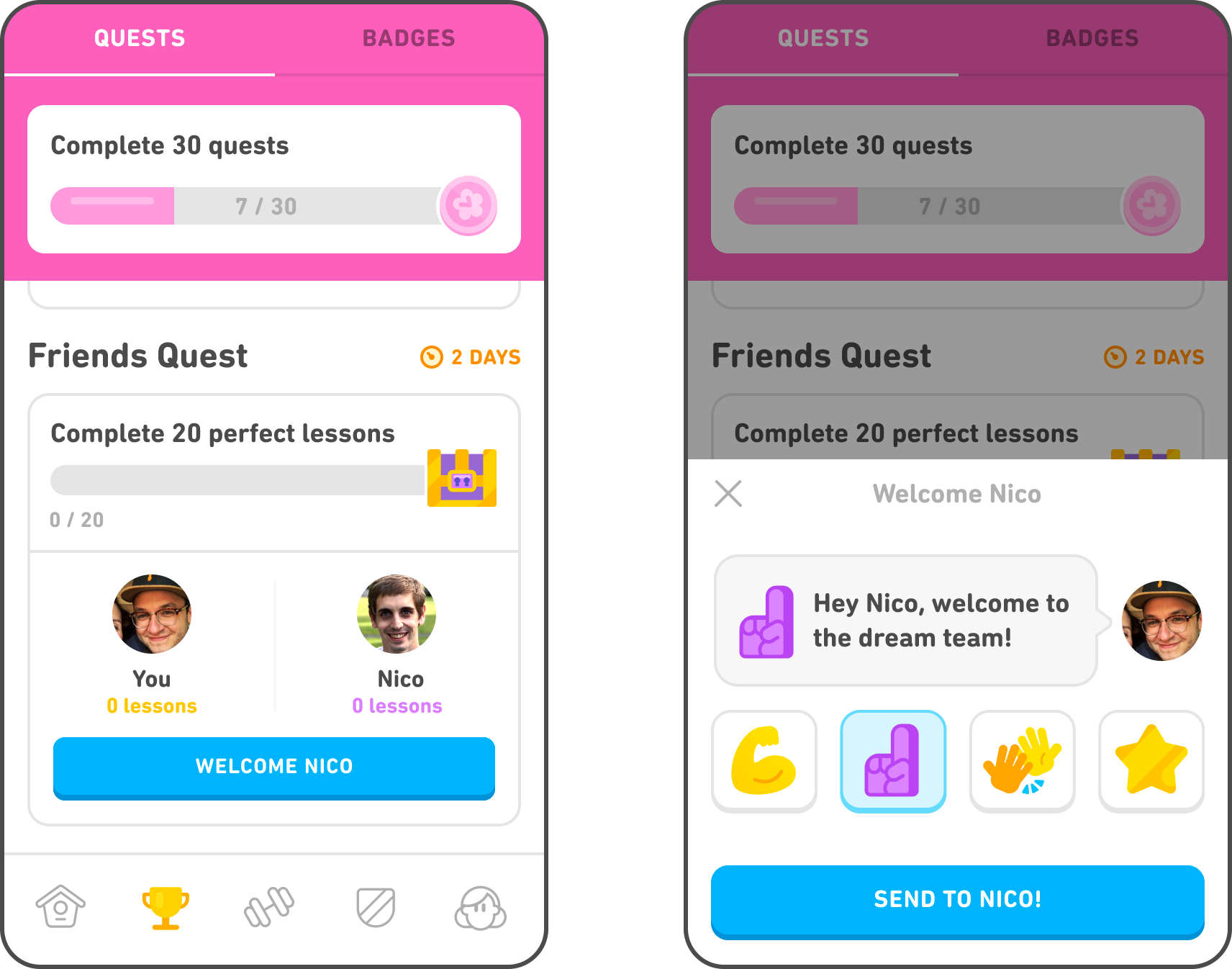
- Friend Quests: Duolingo allows users to team up with friends to complete challenges and earn rewards together.
- Clubs: Although discontinued, Duolingo previously had Clubs where users could join groups and interact with others learning the same language.
Duolingo incorporates social learning elements to make language learning more engaging. These features include:
- Friend Quests: Collaborate with a friend to complete specific tasks within a set time frame.
- Leaderboards: Compete against others in leagues to motivate consistent learning.
- Sharing Progress: Users can share their achievements and progress on social media platforms.
Can You Play Duolingo with Friends?
While Duolingo does not have a direct multiplayer mode, there are ways to engage with friends:
- Friend Quests: Partner with a friend to complete challenges and earn rewards.
- Leaderboards: Add friends to compete in weekly XP rankings.
- Shared Goals: Set mutual language learning goals and track progress together.
What Are the Alternatives to Multiplayer on Duolingo?
Since Duolingo lacks a traditional multiplayer mode, users can explore alternative ways to make learning interactive:
- Language Exchange Apps: Use apps like Tandem or HelloTalk to practice with native speakers.
- Online Communities: Join Duolingo forums or Reddit groups to discuss progress and challenges.
- Offline Study Groups: Form local study groups to practice speaking and learning together.
How Does Duolingo Compare to Multiplayer Language Apps?
Duolingo focuses on individual learning with some social features, while other apps offer more direct multiplayer experiences:
- Duolingo: Primarily solo learning with leaderboards and friend quests for social interaction.
- HelloTalk: Direct messaging and voice calls with native speakers for real-time practice.
- Tandem: Connects users for language exchange and collaborative learning.
Can you use Duolingo Family with friends?

What is Duolingo Family Plan?
The Duolingo Family Plan is a subscription option that allows up to six people to share a single Duolingo Super subscription. This plan is designed to make language learning more affordable and accessible for families or groups of friends. By sharing the subscription, each member gains access to all the premium features of Duolingo Super, such as ad-free learning, unlimited hearts, and personalized practice sessions.
- Cost-effective: Sharing the subscription reduces the overall cost per person.
- Flexible: Up to six users can be added to the plan.
- Premium features: All members enjoy the benefits of Duolingo Super.
Can Friends Use Duolingo Family Plan Together?
Yes, friends can absolutely use the Duolingo Family Plan together. While the plan is marketed as a family option, there are no restrictions on who can be added to the subscription. As long as you have the email addresses of the friends you want to include, you can invite them to join the plan. This makes it a great option for groups of friends who are interested in learning languages together.
- No family requirement: Friends can be added without any issues.
- Easy invitation process: Simply send invites via email.
- Shared learning experience: Friends can motivate each other to stay consistent.
How to Set Up Duolingo Family Plan with Friends
Setting up the Duolingo Family Plan with friends is straightforward. First, the primary account holder needs to purchase the Family Plan subscription. Once the subscription is active, the primary user can invite up to five friends by entering their email addresses. Each friend will receive an invitation to join the plan, and once they accept, they will have full access to Duolingo Super features.
- Purchase the plan: The primary user subscribes to the Family Plan.
- Invite friends: Enter the email addresses of the friends you want to add.
- Accept invitations: Friends confirm their participation to gain access.
Benefits of Using Duolingo Family Plan with Friends
Using the Duolingo Family Plan with friends offers several advantages. It not only makes language learning more affordable but also creates a sense of community and accountability. Friends can track each other's progress, compete in leaderboards, and celebrate milestones together, making the learning process more engaging and enjoyable.
- Cost savings: Splitting the subscription cost reduces individual expenses.
- Motivation: Friendly competition and support keep everyone engaged.
- Shared goals: Learning together fosters a sense of teamwork and accomplishment.
Limitations of Duolingo Family Plan with Friends
While the Duolingo Family Plan is a great option for friends, there are a few limitations to keep in mind. The plan is capped at six users, so larger groups will need to split into multiple subscriptions. Additionally, all members must have their own Duolingo accounts, and the primary account holder is responsible for managing the subscription and payments.
- User limit: Only six people can be included in one plan.
- Account management: The primary user handles all administrative tasks.
- Individual accounts required: Each member must have a Duolingo account.
Why did Duolingo remove friends?

Why Did Duolingo Remove the Friends Feature?
Duolingo removed the friends feature to streamline the app and focus on core functionalities that enhance language learning. The decision was influenced by user feedback and data analysis, which showed that the feature was not widely used or impactful for most learners. Additionally, maintaining the feature required significant resources that could be better allocated to improving other aspects of the platform.
- User engagement: The friends feature had low engagement rates, with only a small percentage of users actively using it.
- Resource allocation: Maintaining the feature required technical and financial resources that could be redirected to more impactful updates.
- Focus on learning: Duolingo prioritized features that directly contribute to language acquisition over social elements.
Was the Friends Feature Popular Among Users?
The friends feature was not particularly popular among Duolingo users. While some enjoyed the social aspect, the majority of users did not actively engage with it. Data showed that most learners preferred focusing on individual progress rather than competing or interacting with friends.
- Low usage rates: Only a small fraction of users utilized the feature regularly.
- Preference for solo learning: Many users found the feature distracting or unnecessary for their language goals.
- Limited impact: The feature did not significantly enhance the learning experience for most users.
How Did Users React to the Removal of the Friends Feature?
User reactions to the removal of the friends feature were mixed. Some users expressed disappointment, as they enjoyed the social and competitive aspects. However, many others supported the decision, agreeing that the feature was not essential for effective language learning.
- Disappointed users: A minority of users missed the social interaction and competition.
- Supportive users: Many users appreciated the focus on core learning features.
- Neutral reactions: Some users were indifferent, as they had never used the feature.
What Replaced the Friends Feature on Duolingo?
After removing the friends feature, Duolingo introduced updates that focused on improving the learning experience. These included enhanced lesson structures, personalized learning paths, and gamified elements like streaks and leaderboards, which motivate users without relying on social interactions.
- Personalized learning: Tailored lessons based on user progress and goals.
- Gamification: Features like streaks and leaderboards to keep users motivated.
- Improved content: Updated and expanded lesson materials for better learning outcomes.
Will Duolingo Bring Back the Friends Feature in the Future?
As of now, Duolingo has not announced plans to bring back the friends feature. The company is focused on enhancing the core learning experience and has not indicated any interest in reintroducing social features. However, user feedback and changing trends could influence future decisions.
- No current plans: Duolingo has not mentioned any intention to reintroduce the feature.
- Focus on learning: The platform remains committed to improving language acquisition tools.
- Potential for change: Future updates could include new social elements if user demand increases.
Can you do Duolingo as a group?

Can You Use Duolingo in a Group Setting?
Yes, you can use Duolingo in a group setting, although the platform is primarily designed for individual learning. Here are some ways to incorporate group activities:
- Shared Goals: Set common language goals with your group and track progress together.
- Leaderboard: Use Duolingo's leaderboard feature to compete with friends or group members.
- Discussion Sessions: After completing lessons, discuss what you’ve learned as a group to reinforce knowledge.
How to Create a Group on Duolingo
While Duolingo doesn’t have a built-in group feature, you can create an informal group using external tools:
- Social Media: Create a group chat on platforms like WhatsApp or Facebook to share progress and tips.
- Shared Accounts: Use a shared email to create a Duolingo account for the group, though this is less ideal.
- External Apps: Use apps like Discord or Slack to organize group discussions and challenges.
Benefits of Learning with a Group on Duolingo
Learning with a group on Duolingo can enhance motivation and engagement:
- Accountability: Group members can hold each other accountable for completing lessons.
- Collaboration: Sharing tips and tricks can help everyone learn faster.
- Fun Competitions: Friendly competition through leaderboards can make learning more enjoyable.
Challenges of Using Duolingo as a Group
There are some challenges to consider when using Duolingo in a group:
- Individual Pace: Group members may progress at different speeds, making it hard to stay synchronized.
- Limited Features: Duolingo lacks built-in group features, requiring external tools for collaboration.
- Privacy Concerns: Sharing progress or accounts may raise privacy issues for some users.
Tips for Effective Group Learning on Duolingo
To make the most of group learning on Duolingo, follow these tips:
- Set Clear Rules: Establish guidelines for participation and progress tracking.
- Regular Check-ins: Schedule regular meetings to discuss progress and challenges.
- Celebrate Milestones: Acknowledge achievements to keep the group motivated.
Frequently Asked Questions From our Community
How does Duolingo With Friends work?
Duolingo With Friends is a feature that allows users to team up with friends and family to make language learning more engaging and collaborative. By connecting with others, you can compete in challenges, track each other's progress, and motivate one another to stay consistent. This feature integrates seamlessly into the Duolingo app, enabling you to invite friends via email, social media, or directly through the platform. Once connected, you can see each other's streaks, achievements, and daily goals, fostering a sense of community and friendly competition.
Can I use Duolingo With Friends with people who speak different languages?
Yes, Duolingo With Friends is designed to work across different languages. Whether your friends are learning Spanish, French, or any other language offered by Duolingo, you can still team up and support each other. The feature focuses on progress and consistency rather than the specific language being studied, making it a versatile tool for multilingual groups. This inclusivity encourages a diverse learning environment where everyone can benefit from shared motivation.
Is Duolingo With Friends free to use?
Duolingo With Friends is available to all Duolingo users, including those on the free version of the app. However, some advanced features, such as unlimited hearts or offline access, may require a Duolingo Plus subscription. The core functionality of teaming up with friends, tracking progress, and participating in challenges is accessible without any additional cost, making it an excellent option for learners on a budget.
How can I invite friends to join Duolingo With Friends?
Inviting friends to join Duolingo With Friends is simple and can be done in a few steps. Open the Duolingo app, navigate to the Friends section, and select the option to invite friends. You can send invitations via email, share a link on social media, or connect directly with friends who already use Duolingo. Once they accept your invitation, you can start collaborating, competing, and celebrating each other's language-learning milestones together.
Leave a Reply
Related Posts