
Duolingo Moved Me Back? Solutions & Steps


Duolingo, a popular language-learning platform, is widely used by millions to master new languages. However, users occasionally encounter issues, such as being unexpectedly moved back in their progress. This can be frustrating, especially after investing significant time and effort. Understanding why this happens and how to resolve it is crucial for a seamless learning experience. This article explores the common reasons behind Duolingo moving users back, including app glitches, account syncing errors, or changes in course content. Additionally, it provides practical solutions and steps to regain lost progress, ensuring learners can continue their language journey without unnecessary setbacks. Stay informed and take control of your Duolingo experience.
Duolingo Moved Me Back? Solutions & Steps
If you've encountered the issue of being moved back in your Duolingo progress, don't worry. This can happen due to various reasons, such as app updates, account syncing issues, or even changes in the course structure. Below, we provide detailed solutions and steps to help you regain your progress and continue your language learning journey.
Why Did Duolingo Move Me Back?
Duolingo may move you back in your progress for several reasons. One common cause is an app update that alters the course structure. Another reason could be a syncing issue between your device and Duolingo's servers. Additionally, if you haven't used the app for a while, Duolingo might reset your progress to ensure you retain the material.
See AlsoDoes Duolingo Ban You: Reasons, Prevention & Recovery TipsHow to Check Your Progress on Duolingo
To verify your progress, open the Duolingo app or website and navigate to your profile. Here, you can see your current level, completed lessons, and any achievements. If you notice discrepancies, it might indicate a syncing issue or a reset due to inactivity.
Steps to Restore Your Progress
1. Log Out and Log Back In: Sometimes, simply logging out and back into your account can resolve syncing issues.
2. Check for Updates: Ensure your app is updated to the latest version to avoid compatibility problems.
3. Contact Duolingo Support: If the issue persists, reach out to Duolingo's support team with details about your account and the problem.
Preventing Future Progress Loss
To avoid losing progress in the future, regularly sync your account by logging in on multiple devices. Additionally, make sure to back up your data and keep your app updated. Consistent usage of the app also helps maintain your progress.
See AlsoWhy Is Duolingo Not Working? Fix App Issues Fast | 2025 GuideCommon Issues and Solutions
Here’s a table summarizing common issues and their solutions:
| Issue | Solution |
|---|---|
| Progress reset after update | Check for app updates and contact support |
| Syncing issues | Log out and log back in, or use a different device |
| Inactivity reset | Use the app regularly to maintain progress |
By following these steps and understanding the reasons behind progress loss, you can effectively manage your Duolingo experience and continue learning without interruptions.
Why has Duolingo moved me back?

Why Has Duolingo Moved Me Back in My Course?
Duolingo may move you back in your course for several reasons. The platform uses an adaptive learning system that adjusts based on your performance and engagement. If you are moved back, it could be due to:
- Inconsistent performance: If you’ve made mistakes in recent lessons, Duolingo might move you back to reinforce weaker areas.
- Long inactivity: If you haven’t used the app for a while, the system might assume you need a refresher on previous material.
- System updates: Duolingo frequently updates its courses, which can sometimes result in users being moved back to align with new content.
How Does Duolingo’s Adaptive Learning System Work?
Duolingo’s adaptive learning system is designed to personalize your learning experience. It tracks your progress and adjusts the difficulty level accordingly. Here’s how it works:
- Skill strength: The system evaluates your skill strength in each topic and may move you back if it detects a decline.
- Spaced repetition: Duolingo uses spaced repetition to ensure you retain information, which might involve revisiting older lessons.
- Performance metrics: Your accuracy, speed, and consistency are analyzed to determine if you need to review previous content.
Can Inactivity Cause Duolingo to Move Me Back?
Yes, inactivity can lead to being moved back in your course. Duolingo aims to ensure you retain what you’ve learned, and long breaks might trigger this adjustment. Key reasons include:
- Skill decay: If you haven’t practiced for a while, the system assumes you may have forgotten some material.
- Refresher lessons: Duolingo may reintroduce older lessons to help you regain confidence and fluency.
- Adaptive algorithms: The app’s algorithms prioritize long-term retention, which may require revisiting past content after a break.
Do Course Updates Affect My Progress on Duolingo?
Course updates can sometimes impact your progress. Duolingo frequently revises its content to improve learning outcomes, which may result in being moved back. Here’s why:
- New content alignment: Updates may require you to revisit lessons to align with new material or teaching methods.
- Skill recalibration: The system might reassess your skills to fit the updated course structure.
- Improved learning paths: Updates often introduce more effective learning paths, which may involve starting from an earlier point.
How Can I Avoid Being Moved Back on Duolingo?
To minimize the chances of being moved back, you can take proactive steps to maintain your progress. Consider the following tips:
- Practice regularly: Consistent practice helps reinforce your skills and prevents skill decay.
- Review weak areas: Use the “Practice” feature to strengthen topics where you struggle.
- Stay updated: Keep an eye on app updates and adjust your learning strategy accordingly.
Can I go back to the old version of Duolingo?

Is it possible to revert to the old version of Duolingo?
Unfortunately, reverting to the old version of Duolingo is not officially supported by the platform. Duolingo frequently updates its interface and features to improve user experience, and these updates are applied universally. Once the new version is rolled out, the old version is no longer accessible. However, there are a few things you can try:
- Check for app updates: Sometimes, older versions of the app might still be available if you haven't updated it recently.
- Use the web version: The web version of Duolingo might retain some older features longer than the mobile app.
- Provide feedback: You can share your preference for the old version with Duolingo through their feedback system.
Why did Duolingo change its interface?
Duolingo changed its interface to enhance user engagement and streamline the learning process. The new design focuses on making the platform more intuitive and visually appealing. Here are some reasons behind the change:
- Improved navigation: The updated interface aims to make it easier for users to find and access lessons.
- Enhanced features: New features like personalized learning paths and gamification elements were introduced.
- User feedback: Changes were made based on extensive user feedback to address common pain points.
Can I use third-party tools to access the old version?
While some users explore third-party tools or modified APKs to access older versions of apps, this approach is not recommended. Here’s why:
- Security risks: Downloading unofficial versions can expose your device to malware or data breaches.
- Violation of terms: Using third-party tools may violate Duolingo’s terms of service, leading to account suspension.
- Unreliable performance: Older versions may not function properly with current server updates, causing glitches or crashes.
What are the alternatives if I don’t like the new version?
If you’re dissatisfied with the new version of Duolingo, there are alternative language-learning platforms you can explore. Here are some options:
- Babbel: Focuses on conversational skills and offers structured lessons.
- Rosetta Stone: Uses immersive techniques to teach languages effectively.
- Memrise: Combines video content with gamified learning for a unique experience.
How can I adapt to the new Duolingo interface?
Adapting to the new Duolingo interface may take some time, but here are tips to ease the transition:
- Explore the new features: Spend time familiarizing yourself with the updated layout and tools.
- Watch tutorials: Look for guides or videos that explain the changes and how to use them effectively.
- Provide constructive feedback: Share your thoughts with Duolingo to help them refine the interface further.
Why has my Duolingo gone back levels?

Why Did Duolingo Reset My Progress?
Duolingo may reset your progress due to several reasons. Here are the most common ones:
- App Updates: Sometimes, updates to the app can cause changes in the course structure, leading to a reset of your progress.
- Account Sync Issues: If you switch devices or log in from a different account, your progress might not sync properly, causing it to appear as if you've gone back levels.
- Course Revisions: Duolingo frequently updates its courses to improve content. These revisions can sometimes result in your progress being adjusted or reset.
Is Duolingo's Level Reset a Bug?
It might be a bug if your progress was reset unexpectedly. Consider the following possibilities:
- Technical Glitches: Bugs in the app can cause progress to reset. Ensure your app is updated to the latest version.
- Server Issues: Duolingo's servers might experience temporary issues, leading to incorrect progress tracking.
- Cache Problems: Clearing your app cache or reinstalling the app can sometimes resolve these issues.
How Does Duolingo's Adaptive Learning Affect Progress?
Duolingo uses adaptive learning to personalize your experience, which can sometimes impact your progress:
- Skill Decay: If you haven't practiced for a while, Duolingo might move you back to reinforce forgotten material.
- Adaptive Testing: The app may reassess your skills and adjust your level based on your performance in recent lessons.
- Personalized Paths: Duolingo's algorithm might reset certain sections to ensure you fully grasp the content before moving forward.
Can I Restore My Duolingo Progress?
Restoring your progress depends on the cause of the reset. Here are some steps you can take:
- Contact Support: Reach out to Duolingo's support team to investigate and potentially restore your progress.
- Check Account Sync: Ensure you're logged into the correct account and that your progress is synced across devices.
- Review Updates: Check if recent updates or course changes caused the reset and adapt to the new structure.
How to Prevent Duolingo Progress Resets?
To avoid losing progress in the future, follow these tips:
- Regular Backups: Take screenshots or notes of your progress as a backup.
- Stay Updated: Keep your app updated to avoid bugs or glitches that might cause resets.
- Consistent Practice: Regular usage reduces the chances of skill decay or adaptive adjustments.
Why did Duolingo change the path?
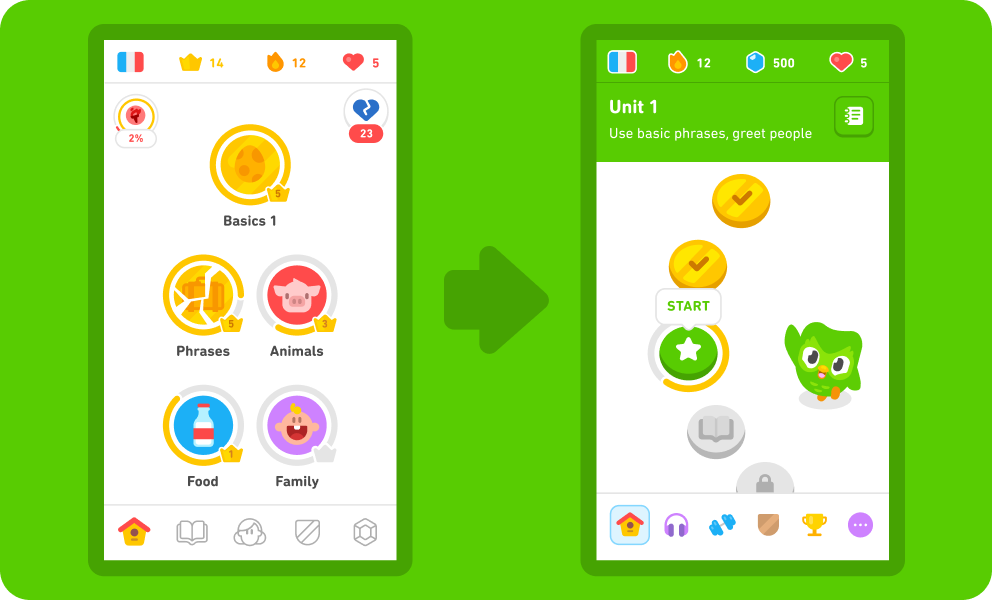
Why Did Duolingo Change the Path?
Duolingo changed the path to improve the learning experience for its users. The new path is designed to be more structured and linear, ensuring that learners progress in a more logical and efficient manner. This change was made to address feedback from users who found the previous system to be confusing or overwhelming due to the lack of a clear progression path.
- Structured Learning: The new path provides a clear sequence of lessons, making it easier for users to follow and understand their progress.
- Improved Retention: By organizing content in a more logical order, Duolingo aims to enhance knowledge retention and long-term learning outcomes.
- User Feedback: The change was largely driven by user feedback, with many learners expressing a need for a more straightforward and guided learning experience.
What Are the Benefits of the New Path?
The new path offers several benefits that aim to enhance the overall learning experience. It provides a more streamlined approach, which helps users stay focused and motivated. Additionally, the new system incorporates adaptive learning techniques to better cater to individual learning styles and paces.
- Streamlined Experience: The linear path reduces confusion and helps users stay on track with their learning goals.
- Adaptive Learning: The system adapts to the user's progress, offering personalized recommendations and challenges.
- Increased Motivation: Clear milestones and achievements keep learners motivated and engaged throughout their language journey.
How Does the New Path Affect User Progress?
The new path has a significant impact on how users track and achieve their progress. It introduces a more transparent and measurable way to monitor learning milestones. Users can now see exactly where they are in their learning journey and what steps they need to take next.
- Transparent Tracking: Users can easily see their progress through the linear path, with clear indicators of completed and upcoming lessons.
- Measurable Milestones: The new system provides specific milestones, making it easier to set and achieve short-term and long-term goals.
- Consistent Feedback: Regular feedback and progress updates help users stay informed about their learning achievements and areas for improvement.
What Challenges Did the Previous System Have?
The previous system faced several challenges that led to the decision to change the path. Users often found it difficult to navigate through the lessons, and the lack of a clear structure made it hard to maintain a consistent learning routine. Additionally, the old system did not effectively address the varying needs of different learners.
- Navigation Issues: The previous system was often described as confusing, with users struggling to find the next appropriate lesson.
- Lack of Structure: Without a clear progression path, users found it challenging to maintain a consistent and effective learning routine.
- One-Size-Fits-All Approach: The old system did not adequately cater to the diverse learning styles and paces of individual users.
How Does the New Path Cater to Different Learning Styles?
The new path is designed to accommodate a variety of learning styles by incorporating adaptive and personalized elements. It recognizes that each learner is unique and adjusts the content and pace accordingly. This approach ensures that users can learn in a way that best suits their individual needs.
- Adaptive Content: The system adjusts the difficulty and type of content based on the user's performance and progress.
- Personalized Recommendations: Users receive tailored recommendations for lessons and exercises that align with their learning goals and preferences.
- Flexible Pacing: The new path allows users to learn at their own pace, ensuring that they can fully grasp each concept before moving on to the next.
Frequently Asked Questions From our Community
Why did Duolingo move me back in my course?
Duolingo may move you back in your course for several reasons. One common cause is inactivity; if you haven’t practiced for a while, the platform might adjust your progress to ensure you retain the material. Another reason could be algorithmic adjustments, where Duolingo’s system identifies gaps in your learning and moves you back to reinforce weaker areas. Additionally, if you’ve been skipping lessons or not completing them thoroughly, the app might reset your progress to ensure mastery.
How can I prevent Duolingo from moving me back?
To avoid being moved back, ensure you practice consistently and complete lessons thoroughly. Regularly review older material using the “Practice” feature to strengthen your skills. Avoid skipping lessons or rushing through them, as Duolingo’s algorithm tracks your performance and may reset your progress if it detects insufficient mastery. Staying active on the platform and engaging with the content daily can help maintain your progress.
Can I regain my lost progress on Duolingo?
Yes, you can regain your lost progress by revisiting the lessons where you were moved back. Focus on completing these lessons with a high level of accuracy to demonstrate mastery. Additionally, use the “Practice” feature to reinforce your skills and rebuild your progress. If you believe the move was a mistake, you can contact Duolingo’s support team for assistance, though they may not always restore your progress.
Does Duolingo notify users before moving them back?
Duolingo typically does not notify users before moving them back. The platform’s algorithm automatically adjusts progress based on your activity and performance. However, if you notice a sudden change in your progress, it’s likely due to inactivity, skipped lessons, or identified gaps in your learning. To stay informed, regularly check your progress and ensure you’re meeting the platform’s expectations for consistent practice and mastery.
Leave a Reply
Related Posts