
How To Add Someone To Your Duolingo Family Plan? in 2025


Duolingo’s Family Plan offers a cost-effective way for multiple users to access premium features, making language learning more accessible for families and friends. As of 2025, the process of adding someone to your Duolingo Family Plan remains straightforward, but it’s essential to understand the steps to ensure a smooth experience. Whether you’re inviting a family member, friend, or colleague, this guide will walk you through the process, from setting up your plan to managing members effectively. By following these instructions, you can maximize the benefits of Duolingo Premium while sharing the joy of language learning with your loved ones.
How To Add Someone To Your Duolingo Family Plan in 2025
What is the Duolingo Family Plan?
The Duolingo Family Plan is a subscription option that allows up to six users to share the benefits of Duolingo Premium. This plan is ideal for families or groups who want to learn languages together while saving money. It includes features like ad-free learning, unlimited hearts, and offline access for all members.
How to Purchase a Duolingo Family Plan
To purchase the Duolingo Family Plan, follow these steps:
1. Log in to your Duolingo account.
2. Go to the Subscription section in your account settings.
3. Select the Family Plan option.
4. Complete the payment process using your preferred method.
Once purchased, you can start adding members to your plan.
Steps to Add Someone to Your Duolingo Family Plan
Adding someone to your Duolingo Family Plan is simple:
1. Open the Duolingo app or website and log in.
2. Navigate to the Family Plan section in your settings.
3. Click on Add Member.
4. Enter the email address of the person you want to add.
5. Send the invitation. The recipient will receive an email with instructions to join.
Managing Your Duolingo Family Plan Members
You can manage your Duolingo Family Plan members by:
- Removing members: Go to the Family Plan section, select the member, and click Remove.
- Replacing members: Remove a member and send an invitation to a new one.
- Monitoring usage: Check each member’s progress and activity in the Family Plan dashboard.
Benefits of the Duolingo Family Plan
The Duolingo Family Plan offers several advantages:
- Cost-effective: Save money compared to individual subscriptions.
- Shared learning: Encourage family members to learn together.
- Flexible management: Easily add or remove members as needed.
| Feature | Description |
|---|---|
| Ad-free learning | No interruptions from ads during lessons. |
| Unlimited hearts | No restrictions on mistakes during practice. |
| Offline access | Download lessons and learn without an internet connection. |
| Up to 6 members | Share the plan with family or friends. |
How much is Duolingo family Plan 2025?

What is the Duolingo Family Plan 2025?
The Duolingo Family Plan 2025 is a subscription option that allows up to six family members to access Duolingo's premium features under a single account. This plan is designed to make language learning more affordable and convenient for families. Key features include:
See AlsoDuolingo Family Plan: The Ultimate Guide to Learning Languages Together- Ad-free learning for all members.
- Unlimited hearts to avoid interruptions during lessons.
- Progress tracking for each family member.
How much does the Duolingo Family Plan 2025 cost?
The Duolingo Family Plan 2025 is priced at approximately $119.99 per year. This cost is significantly lower than purchasing individual Super Duolingo subscriptions for each family member. Benefits include:
- Cost savings compared to individual plans.
- Flexibility to add or remove members as needed.
- Access to all premium features for up to six users.
What are the benefits of the Duolingo Family Plan 2025?
The Duolingo Family Plan 2025 offers numerous advantages for families looking to learn languages together. These benefits include:
- Shared progress to motivate and support each other.
- Customizable learning paths for different skill levels.
- Offline access to lessons for convenience.
How to sign up for the Duolingo Family Plan 2025?
Signing up for the Duolingo Family Plan 2025 is a straightforward process. Follow these steps:
- Visit the Duolingo website or app.
- Navigate to the subscription section and select the Family Plan.
- Add up to six family members and complete the payment process.
Is the Duolingo Family Plan 2025 worth it?
Determining whether the Duolingo Family Plan 2025 is worth it depends on your family's language learning goals. Consider the following:
- Cost-effectiveness for multiple users.
- Premium features that enhance the learning experience.
- Flexibility to accommodate different learning paces.
Can someone add me to the Duolingo family plan?

How Does the Duolingo Family Plan Work?
The Duolingo Family Plan allows up to six people to share a single Duolingo Plus subscription. This plan is cost-effective and provides all members with access to premium features such as ad-free learning, offline lessons, and unlimited hearts. Here’s how it works:
- The plan owner purchases the Family Plan subscription.
- They can then invite up to five other users via email.
- Invited members must accept the invitation to join the plan.
- Once joined, all members enjoy the same premium benefits.
Who Can Add Me to a Duolingo Family Plan?
Only the plan owner can add you to a Duolingo Family Plan. If you know someone who already has a Family Plan, they can send you an invitation. Here’s what you need to know:
- The plan owner must have an active Duolingo Plus Family Plan subscription.
- They need your email address to send the invitation.
- You must have a Duolingo account to accept the invitation.
What Are the Benefits of Joining a Duolingo Family Plan?
Joining a Duolingo Family Plan offers several advantages, especially if you want to save money while accessing premium features. The benefits include:
- Ad-free learning: No interruptions from ads during lessons.
- Offline access: Download lessons and learn without an internet connection.
- Unlimited hearts: Avoid being locked out of lessons for making mistakes.
- Progress tracking: Monitor your learning progress more effectively.
How Much Does the Duolingo Family Plan Cost?
The cost of the Duolingo Family Plan varies depending on your region, but it is generally more affordable than individual subscriptions. Here’s a breakdown:
- The plan costs approximately twice the price of an individual Duolingo Plus subscription.
- It covers up to six users, making it a cost-effective option for families or groups.
- Payment is typically charged annually, but some regions may offer monthly options.
Can I Join a Duolingo Family Plan Without Knowing the Plan Owner?
No, you cannot join a Duolingo Family Plan without being invited by the plan owner. Here’s why:
- The plan owner must send you an invitation link via email.
- You need to accept the invitation to be added to the plan.
- Random users cannot join a Family Plan without the owner’s consent.
How do I add someone on Duolingo?

How to Add Someone on Duolingo Using Their Username
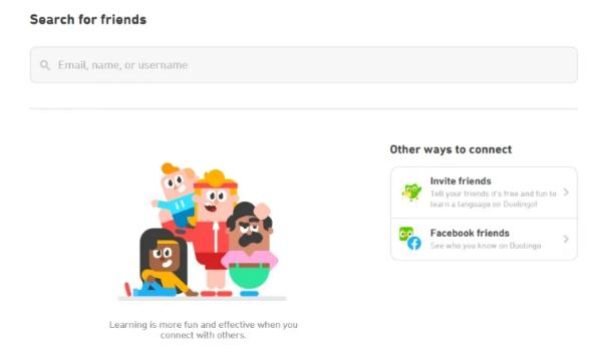
To add someone on Duolingo using their username, follow these steps:
- Open the Duolingo app or go to the Duolingo website and log in to your account.
- Click on the profile icon located at the bottom right corner of the app or the top right corner of the website.
- Select the “Add Friends” option from the menu.
- Enter the username of the person you want to add in the search bar.
- Click on the “Add” button next to their profile to send a friend request.
How to Add Someone on Duolingo Using Their Email
If you know the email address of the person you want to add, follow these steps:
- Log in to your Duolingo account on the app or website.
- Navigate to the “Add Friends” section from your profile.
- Choose the “Invite by Email” option.
- Enter the email address of the person you want to add.
- Send the invitation, and they will receive an email to connect with you on Duolingo.
How to Add Friends on Duolingo Through Facebook
If your Facebook account is connected to Duolingo, you can add friends easily:
- Ensure your Facebook account is linked to your Duolingo profile.
- Go to the “Add Friends” section in your Duolingo profile.
- Select the “Find Friends from Facebook” option.
- Duolingo will display a list of your Facebook friends who are also on Duolingo.
- Click “Add” next to the names of the friends you want to connect with.
How to Accept Friend Requests on Duolingo
If someone sends you a friend request on Duolingo, here’s how to accept it:
- Open the Duolingo app or website and log in to your account.
- Go to your profile and check the “Notifications” tab.
- Look for the friend request notification and click on it.
- Review the request and click “Accept” to add the person to your friends list.
How to Find and Add Friends on Duolingo Using Leaderboards
You can also add friends through Duolingo’s leaderboard feature:
- Participate in a Duolingo league to access the leaderboard.
- Scroll through the list of participants in your league.
- Click on the profile of a user you want to add.
- Select the “Add as Friend” option on their profile page.
- Wait for them to accept your friend request.
Can I be friends with my kid on Duolingo?
Can I Be Friends with My Kid on Duolingo?
Yes, you can be friends with your kid on Duolingo. The platform allows users to connect with friends, including family members, to track progress, motivate each other, and engage in friendly competition. To add your child as a friend, you need to know their Duolingo username or have them share their profile link with you. Once connected, you can see each other's progress, send encouraging messages, and participate in leaderboards together.
How to Add Your Kid as a Friend on Duolingo
Adding your child as a friend on Duolingo is a straightforward process. Follow these steps:
- Ask your child for their Duolingo username or profile link.
- Go to the Friends tab on your Duolingo app or website.
- Search for their username or paste their profile link.
- Send a friend request and wait for them to accept it.
Once accepted, you can start interacting and tracking each other's progress.
Benefits of Being Friends with Your Kid on Duolingo
Being friends with your child on Duolingo offers several advantages:
- Motivation: You can encourage each other to stay consistent with language learning.
- Progress Tracking: Easily monitor your child's progress and celebrate their achievements.
- Healthy Competition: Compete in leaderboards to make learning more engaging and fun.
Privacy Considerations When Adding Your Kid on Duolingo
When connecting with your child on Duolingo, it's important to consider privacy:
- Ensure your child's profile is set to private if you want to limit visibility to only friends.
- Discuss with your child about sharing their username only with trusted individuals.
- Monitor their interactions to ensure they are safe and appropriate.
Tips for Making Duolingo Fun for You and Your Kid
To make the most of being friends with your child on Duolingo, try these tips:
- Set weekly challenges to complete lessons together.
- Celebrate milestones with small rewards to keep motivation high.
- Use the leaderboard feature to create friendly competition.
Frequently Asked Questions From our Community
How do I add someone to my Duolingo Family Plan in 2025?
To add someone to your Duolingo Family Plan in 2025, you need to first ensure that you are the primary account holder of the plan. Log in to your Duolingo account on the web or mobile app, navigate to the Subscription section, and select the Family Plan option. From there, you can invite members by entering their email addresses or sharing a unique link. Once they accept the invitation, they will be added to your plan and gain access to all premium features.
Can I add someone to my Duolingo Family Plan if they are in a different country?
Yes, you can add someone to your Duolingo Family Plan even if they are in a different country. Duolingo’s Family Plan is designed to work globally, allowing you to invite users from anywhere in the world. However, ensure that the person you are inviting has a valid Duolingo account and that their account is set to the same language preferences if necessary. The process of adding them remains the same, regardless of their location.
Is there a limit to how many people I can add to my Duolingo Family Plan?
Yes, there is a limit to how many people you can add to your Duolingo Family Plan. As of 2025, the plan allows you to add up to five additional members, making a total of six users, including yourself. This limit is set by Duolingo to ensure fair usage and to maintain the quality of the service. If you attempt to add more than five members, you will need to remove an existing member before adding a new one.
What happens if someone I added to my Duolingo Family Plan leaves?
If someone you added to your Duolingo Family Plan decides to leave, their spot will become available for you to invite another member. To remove a member, go to the Family Plan settings in your Duolingo account, select the member you wish to remove, and confirm the action. Once removed, you can send a new invitation to another person. Keep in mind that the removed member will lose access to the premium features unless they join another Family Plan or purchase their own subscription.
Leave a Reply
Related Posts