
How To Start Duolingo Over: Start Fresh with a Clean Slate

Starting fresh on Duolingo can be a great way to rekindle your language-learning journey or correct past mistakes. Whether you’ve taken a long break, want to reset your progress, or simply feel the need to begin again with a clean slate, Duolingo makes it easy to restart your course. This guide will walk you through the steps to reset your account, clear your progress, and set new goals. By starting over, you can approach your language studies with renewed focus and motivation, ensuring a more structured and effective learning experience. Let’s explore how to reset Duolingo and make the most of your fresh start.
How To Start Duolingo Over: Start Fresh with a Clean Slate
Starting over on Duolingo can be a great way to refresh your language learning journey. Whether you want to reset your progress, change your learning goals, or simply start from scratch, this guide will walk you through the steps to achieve a clean slate on Duolingo.
Why Would You Want to Start Over on Duolingo?
There are several reasons why someone might want to start over on Duolingo. Perhaps you feel like you’ve forgotten the basics and want to revisit them, or maybe you’ve switched to a new language and want to reset your progress. Starting over can also help you feel more motivated and organized in your learning journey.
See AlsoWhat is Qingming Festival or Tomb Sweeping Day?How to Reset Your Progress on Duolingo
Resetting your progress on Duolingo is straightforward. First, go to the Settings menu on the app or website. Look for the option to Reset or Remove Languages. Select the language you want to reset, and confirm your choice. This will erase all your progress and allow you to start fresh.
Can You Delete Your Duolingo Account and Start Over?
Yes, you can delete your Duolingo account and create a new one if you want a completely fresh start. To do this, go to the Account Settings section, scroll down, and select Delete Account. After deleting your account, you can sign up again with a new email address and start from scratch.
Tips for Starting Over Effectively on Duolingo
When starting over, it’s important to set clear goals. Decide how much time you want to dedicate daily and stick to a routine. Use Duolingo’s Streak feature to stay motivated. Additionally, consider combining Duolingo with other language learning resources like podcasts, books, or language exchange partners for a more comprehensive approach.
See AlsoPlaying computer games in Chinese: Diablo 3 and Starcraft 2What Happens to Your Streak and Achievements When You Reset?
When you reset your progress, your Streak and Achievements will be reset as well. This means you’ll lose your current streak and any badges you’ve earned. However, this can also be an opportunity to build a new streak and earn achievements again, which can be highly motivating.
| Action | Outcome |
|---|---|
| Reset Progress | Erases all progress in the selected language |
| Delete Account | Completely removes your account and data |
| Start Fresh | Allows you to begin learning from scratch |
| Streak Reset | Lose your current streak and start over |
| Achievements Reset | Lose all earned badges and achievements |
How to start Duolingo from the beginning again?
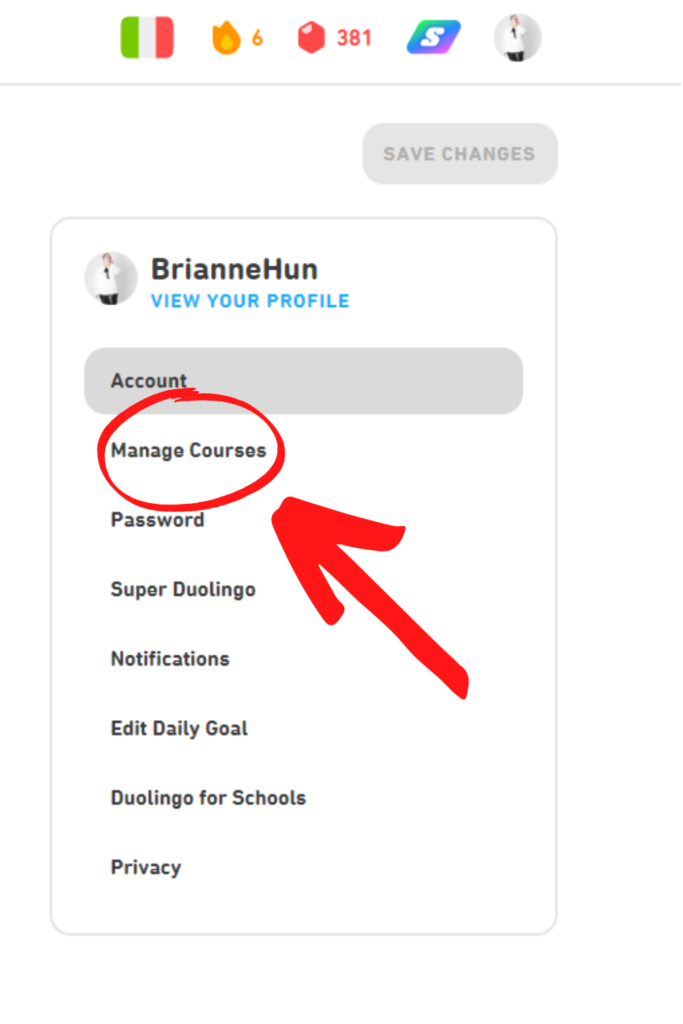
How to Reset Your Duolingo Progress
To start Duolingo from the beginning again, you need to reset your progress. This can be done by accessing your account settings. Follow these steps:
See AlsoHOW TO - Communicate with your Chinese In-Laws (Phrases & Tips)- Open the Duolingo app or website and log in to your account.
- Go to your profile settings by clicking on your profile picture.
- Scroll down and find the Settings or Manage Courses option.
- Look for the Reset or Remove Languages option and select it.
- Confirm that you want to reset your progress. This will erase all your current progress and allow you to start over.
Creating a New Duolingo Account
If you prefer not to reset your existing account, you can create a new one. This is useful if you want to keep your old progress while starting fresh. Here’s how:
- Log out of your current Duolingo account.
- Sign up for a new account using a different email address or social media account.
- Choose the language you want to learn and begin from the basics.
- Ensure you do not link this new account to your previous one to avoid data overlap.
Using Duolingo’s Practice Feature to Review Basics
If you don’t want to reset your progress but still want to review the basics, Duolingo offers a practice feature. This allows you to revisit earlier lessons without losing your current progress. Follow these steps:
- Open the Duolingo app or website.
- Navigate to the Practice tab, usually represented by a heart icon.
- Select the earliest lessons or topics you want to review.
- Complete the exercises to reinforce your foundational knowledge.
Switching to a New Language and Starting Over
If you want to start fresh by learning a new language, Duolingo allows you to switch languages easily. Here’s how:
See Also4 Popular Chinese TV Shows to Start Watching- Open the Duolingo app or website and log in.
- Go to your profile settings and select Manage Courses.
- Add a new language by clicking on Add a New Course.
- Choose the language you want to learn and start from the beginning.
Contacting Duolingo Support for Account Reset
If you encounter issues resetting your progress, you can contact Duolingo Support for assistance. Here’s how:
- Visit the Duolingo Help Center on their website.
- Submit a request explaining that you want to reset your progress.
- Provide your account details for verification.
- Wait for a response from the support team to guide you through the process.
Can I reset my progress in Duolingo?

How to Reset Progress in Duolingo
Yes, you can reset your progress in Duolingo. This process is often referred to as starting over or resetting a course. To do this, follow these steps:
- Open the Duolingo app or website and log into your account.
- Navigate to the course you want to reset.
- Click on the Settings (gear icon) next to the course title.
- Select the option to Reset or Remove Progress.
- Confirm your choice, and your progress will be reset to the beginning.
Why Would Someone Reset Their Duolingo Progress?
There are several reasons why a user might want to reset their progress in Duolingo:
- Refreshing knowledge: If you haven’t used the app in a while, resetting helps you start from scratch.
- Starting over: Some users prefer to re-learn the basics for better retention.
- Switching languages: You might want to focus on a different language and reset the current one.
Does Resetting Progress Delete All Data?
Resetting your progress in Duolingo does not delete your account or all your data. It only resets the specific course you choose. Here’s what happens:
- Your streaks and achievements remain intact.
- Your leaderboard status is unaffected.
- Only the selected course’s progress is reset to Level 1.
Can You Undo a Progress Reset in Duolingo?
Unfortunately, once you reset your progress in Duolingo, it cannot be undone. Consider these points before resetting:
- Make sure you are certain about resetting, as progress cannot be restored.
- If you want to keep your progress, consider creating a new account instead.
- Backup your progress by taking screenshots or notes if needed.
Alternatives to Resetting Progress in Duolingo
If you’re unsure about resetting, there are alternatives to consider:
- Use the Practice feature to revisit old lessons without resetting.
- Take a placement test to skip ahead or adjust your level.
- Create a new account to start fresh while keeping your original progress.
Can I start over my Duolingo account?
Can I Reset My Duolingo Progress?
Yes, you can reset your Duolingo progress if you want to start over. This is useful if you feel you need to revisit the basics or if you want to re-experience the learning process. To reset your progress:
- Go to your Duolingo profile on the website (this option is not available on the mobile app).
- Click on the Settings icon (gear icon).
- Scroll down and select Reset or remove languages.
- Choose the language you want to reset and confirm your decision.
What Happens When I Reset My Duolingo Account?
When you reset your Duolingo account, all your progress, including completed lessons, streaks, and achievements, will be erased. Here’s what you should know:
- Your streak will be reset to zero.
- All completed lessons and skills will be marked as incomplete.
- Your achievements and XP will remain in your profile but will no longer reflect your current progress.
Can I Restore My Progress After Resetting?
Unfortunately, once you reset your Duolingo progress, it cannot be restored. Here’s what you need to consider:
- Duolingo does not offer a backup or restore option for reset progress.
- If you want to save your progress, consider taking screenshots or notes before resetting.
- Think carefully before resetting, as it is a permanent action.
Is Resetting My Duolingo Account Free?
Yes, resetting your Duolingo account is completely free. There are no charges associated with this feature. However, keep in mind:
- You will lose all your progress and streaks.
- Your Duolingo Plus subscription (if any) will remain active, but your progress will still be reset.
- This feature is available to all users, regardless of their subscription status.
Can I Reset Only Specific Skills in Duolingo?
No, Duolingo does not currently allow users to reset specific skills individually. When you reset your account, it affects the entire language course. Here’s what you can do instead:
- Use the Practice feature to revisit specific skills without resetting your entire progress.
- Manually go back to earlier lessons and redo them to refresh your knowledge.
- Consider using the Test Out feature to skip ahead if you feel confident in certain areas.
Is there a way to retest on Duolingo?
How to Retest on Duolingo
Yes, there is a way to retest on Duolingo. The platform offers a feature called Checkpoint Quiz that allows users to retest their knowledge. This quiz is designed to evaluate your progress and ensure you have mastered the skills in a specific section. Here’s how you can access it:
- Open the Duolingo app or website and navigate to the skill tree.
- Look for the checkpoint icon, which resembles a flag, located at the end of each unit.
- Click on the checkpoint to start the quiz. If you pass, you can skip ahead to the next unit.
Can You Retake a Duolingo Test?
Yes, you can retake a Duolingo test, but it depends on the type of test. For example, the placement test can be retaken by resetting your progress. Here’s how:
- Go to your profile settings on Duolingo.
- Select the option to reset or remove languages.
- Choose the language you want to retest in and confirm the reset.
- Start the placement test again to reassess your level.
Is There a Practice Test Feature on Duolingo?
Duolingo provides a practice feature that allows users to review and retest their skills. This feature is available in the Practice Hub and is useful for reinforcing knowledge. Here’s how to use it:
- Access the Practice Hub from the bottom menu on the app or website.
- Select the skill or topic you want to practice.
- Complete the exercises to strengthen your understanding and retest your abilities.
How to Retake a Failed Checkpoint Quiz on Duolingo
If you fail a Checkpoint Quiz, you can retake it after completing additional lessons. Here’s what you need to do:
- Continue practicing the lessons in the unit where you failed the quiz.
- Once you feel confident, return to the checkpoint icon and retake the quiz.
- Passing the quiz will allow you to progress to the next unit.
Duolingo’s Super Duolingo (premium) users have additional features that can aid in retesting. These include unlimited hearts and access to personalized practice sessions. Here’s how premium users can benefit:
- Unlimited hearts allow you to retake tests without worrying about losing progress.
- Access to personalized practice helps reinforce weak areas before retesting.
- Premium users can also review mistakes from previous tests to improve performance.
Frequently Asked Questions From our Community
How do I reset my progress on Duolingo to start over?
To reset your progress on Duolingo, you need to delete your current account and create a new one. This is because Duolingo does not offer a built-in feature to reset progress while keeping the same account. First, go to your account settings, select Delete Account, and confirm the deletion. Afterward, sign up again using a new email address or the same one if enough time has passed. This will allow you to start fresh with a clean slate.
Can I restart Duolingo without losing my streak?
Unfortunately, restarting Duolingo from scratch means you will lose your current streak. The streak is tied to your account, and deleting or resetting your progress will erase it. If maintaining your streak is important, consider creating a secondary account to practice from the beginning while keeping your original account intact. This way, you can preserve your streak while exploring the content anew.
Is there a way to reset only specific courses on Duolingo?
Duolingo does not currently allow users to reset individual courses without affecting the entire account. If you want to restart a specific course, you would need to manually skip ahead or redo lessons within the same account. Alternatively, you can create a new account to focus solely on that course while keeping your original progress intact elsewhere.
What happens to my achievements if I start over on Duolingo?
When you start over on Duolingo by deleting your account, all your achievements, including badges, XP, and completed levels, will be permanently lost. If you want to retain your achievements, consider continuing with your current account or using a secondary account to explore the content from the beginning. This allows you to keep your accomplishments while still experiencing the platform anew.
Leave a Reply
Related Posts